API tokens
User-scoped API tokens let you call any /api/* endpoint from your own scripts without doing the JWT login dance. They're what powers Scribe, but you can issue your own for cron jobs, importers, dashboards, anything.
Format
Tokens look like tome_AbCdEf123…. The tome_ prefix is constant; the body is 32 random URL-safe bytes. Server-side, only the sha256 hash is stored — the secret itself is shown exactly once at creation time and never again.
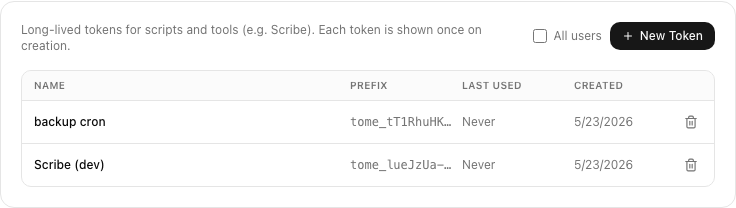
Creating a token
- Open Settings → API tokens.
- Click New token, give it a name (so future-you remembers what it's for).
- The full
tome_…secret appears once. Copy it now. - Store it somewhere safe (a password manager, an env var, an
.envfile your VCS ignores).
Universal scope
A token authenticates as the user who created it. Every /api/* endpoint accepts either a JWT (from a logged-in browser) or a tome_… bearer token — they're interchangeable. There are no per-scope tokens (yet): an admin's token has admin powers, a guest's token has guest powers.
Using a token
Send it as a bearer token in the Authorization header. Examples in three flavours:
# Replace TOKEN with your tome_… secret
curl -H "Authorization: Bearer $TOKEN" \
     https://your-tome.example.com/api/books?limit=5
Homepage widget
If you run Homepage, a token is all you need to put your reading stats on a dashboard tile - no Tome-side setup. Tome's GET /api/home/stats endpoint returns a flat JSON summary (current streak, books finished, time read, and pages turned over the last 30 days) that maps straight onto Homepage's customapi widget:
- Tome:
    icon: mdi-book-open-page-variant
    href: https://your-tome.example.com
    widget:
      type: customapi
      url: https://your-tome.example.com/api/home/stats
      headers:
        Authorization: Bearer tome_xxxxxxxx
      mappings:
        - field: current_streak_days
          label: Streak
          suffix: " days"
        - field: books_finished_30d
          label: Finished (30d)
        - field: reading_seconds_30d
          label: Read (30d)
          format: duration
        - field: pages_turned_30d
          label: Pages (30d)
The duration format expects seconds, which is exactly whatreading_seconds_30d is - no conversion needed. One nuance: streak days are bucketed in UTC by default. If your streak looks off-by-one around midnight, append?tz_offset=-120 to the widget URL (JS convention: the negative of your UTC offset in minutes, so UTC+2 is -120).
Revoking
In Settings → API tokens, find the token by name or prefix and clickRevoke. The hash is deleted; any further calls with that secret 401 immediately. Revocation is irreversible.
Admin view
Admins can see — and revoke — every user's tokens from Admin → Users → [user] → Tokens. Useful when an account is compromised or a member leaves the household and you want to nuke their scripts. Admins cannot view the secret (it's only the hash) but they can kill it.