Changelog
Release notes per version, newest first — generated straight fromCHANGELOG.mdin the repo, the single source of truth. Release codenames follow a book-craft theme (Codex, Vellum, Marginalia, Signature…).
[Unreleased]
Added
- Supporters on the About page. Settings > About lists the people who sponsor Tome on GitHub Sponsors. The repo also shows a Sponsor button. Sponsoring is a thank-you; nothing in Tome is locked behind it.
[2.7.1] - 2026-10-19
Fixed
- Downloading a single book without a book type no longer crashes KOReader. Tapping one such book in the TomeSync series browser, or downloading from an author or search list, crashed the reader (and on a Kindle lost unsaved settings such as a fresh sign-in). Tome now sends a type for every book: the series' type for a volume of a series, "book" otherwise, so plugins already on devices are fixed by updating Tome. The plugin also ignores a missing type itself. An untyped volume downloads into the same folder as the rest of its series. Plugin build 51. Reported by @kastro5. (#259)
[2.7.0] - 2026-10-17 - "Catalogue"
Added
- Searching for a series shows the series. When a search matches a series name ("good guys" finds The Good Guys), the series appear as cards in a row above the matching books, with author, volume count and reading progress, and open the series page on click. Each word of the search only has to start a word of the name, so a half-typed search already finds it.
- Fallback server URL for the KOReader plugin. TomeSync > Settings has an optional second address for the same server, tried when the main one does not answer: for example the LAN address at home when the main URL only works from outside (a router without hairpin NAT, a VPN address). Whichever address answered last is tried first, so after a network change the plugin switches once and sticks with it. (#249)
- See which books are on your e-reader. The KOReader plugin now tells Tome which of its books are on the device, and books show an "On Kindle" pill (named after the device) on cards and the book page. The filters get a row per device with "On Kindle" and "Not on Kindle", which can be saved as a shelf and also work in shelves browsed on the device; series pages show how many volumes each device holds and mark them on the covers. The list is sent on launch, wake, WiFi up, Sync now and after downloads, and replaces the previous one, so books deleted on the device drop out on the next sync. A device that has not synced in a few days is shown muted with its age, and Settings > KOReader lists your devices with a way to forget one. Only your own devices are ever shown. Plugin build 50.
Fixed
- Home no longer jumps down after it has loaded. For admins who had not answered the telemetry question yet, its card arrived a moment after the rest of the page and pushed everything down. Home now waits for it and draws it together with the other sections. (#254)
- "Connect a phone" works when Tome is open at localhost. The QR code
carried the address the page was opened at, so from
localhostit told the phone to connect to itself and pairing could never succeed. Opened at localhost, 127.x or ::1, the window now says so and asks for the address the phone can reach this computer at (for examplehttp://192.168.1.20:8080), builds the QR from that and remembers it in this browser. Other addresses work as before. (#253) - The Filters button no longer shows a "0" badge during a search. A search on its own counted as "filters active" but has no filter chip, so the badge read 0; it now only appears when a filter is actually set.
- The KOReader plugin no longer freezes the reader when the server is down. When the device was online but Tome did not answer, every sync request held the screen for its 5 second timeout, and it took three misses before the plugin backed off, so startup and opening a book each stalled. It now backs off after the first miss, waits 1, 2, 4, 8 and then 15 minutes between tries, and goes back to normal as soon as a request gets through, WiFi reconnects or you use a TomeSync action such as Sync now. Opening a book no longer waits on the network at all. Reading offline was never affected. Plugin build 49. (#249)
- Google Books 503s no longer fail the fetch outright. Google answers in bursts of "503 Service Unavailable", and Tome gave up on the first one, so the search had to be clicked again by hand. A 5xx from any metadata source now gets the same single retry after a short pause that a rate limit already got, and only then reports the source as errored. The warning logged on a failed fetch also no longer includes the request URL, which for Google Books carried the configured API key. (#247)
Changed
- The web app stays signed in until you sign out. Signing in in a
browser used to last 7 days (
TOME_JWT_EXPIRE_MINUTES), after which you had to sign in again. A browser now stays signed in like the Tome app does, until you sign out there. Each browser is listed under Settings > Connected devices with its browser and system (for example Safari on macOS, marked "This browser" on the one you are using), where you can sign out any of them, such as a lost laptop. A browser that is not used for 90 days is signed out on its own (TOME_WEB_SESSION_IDLE_DAYS, 0 = never), so a forgotten or copied sign-in does not live forever; using Tome even once in that time keeps it. The Tome app is not affected. Changing your password signs out every other browser and app; an admin setting a user's password signs that user out everywhere. Browsers signed in before this update keep their old sign-in until it runs out, then stay signed in from their next sign-in. - Settings has a jump list. A sticky list of the page's sections sits on the left at desktop width, and a row of chips under the header on phones. It follows your scroll position and jumps to a section on click, so a setting is one click away instead of a scroll through the whole page.
- Covers load much faster. Grids and lists now get small WebP copies of
the covers (made once and kept in
data/cover_thumbs/) instead of the full-size image, which for covers fetched from a metadata source could be over 2 MB. The browser keeps them, so coming back to the library shows the covers right away without asking the server again, and a cover the browser already has appears at once instead of fading in. Changing a cover still shows the new one everywhere, also when you upload a second cover over the first. Covers further down the library are loaded in the background while you look at the top (and the first ones while you are on Home, so switching to All Books shows them at once), and the next page of books is fetched well before you reach the end, so scrolling down no longer shows covers popping in, and Safari clearing its cache no longer drops them. (#254) - Tome opens with the page already filled in. Tome remembers what each page asked the server for when it opened, and on the next visit asks for it right away, while the app itself is still loading, instead of one step after another. The loading logo stays up until the page has its data (at most a second longer) and then fades out over the finished page, so a reload goes straight from the logo to the page instead of through a spinner and grey placeholders. (#254)
- Going back to the library keeps your place. Coming back from a book (or Stats, Settings, anywhere) shows the library as you left it, scrolled to where you were, also past the first 60 books, and refreshes it quietly instead of blanking it. Home works the same way: no grey placeholders on the way back. The library tab no longer loads Home's sections it does not show. (#255)
- Tome loads less up front. The app's main file is a fifth of its old size (515 KB instead of 2.4 MB). Stats, Settings, Admin, Bindery and the other pages load as their own pieces, fetched in the background once Tome is open, and the full icon set for libraries and shelves loads only when an icon outside the common ones is shown or the icon picker opens. (#255)
- Smaller downloads from the server. The server now compresses its responses (the book list goes from 55 KB to 6 KB), never book files or images. The app's files are cached by the browser for good, since their names change with every release, and the page itself is always checked, so an update never leaves a browser on the old version. (#255)
- Faster library pages on big libraries. New database indexes for the book list, series, reading status and session queries (added on startup), and the series overview reads all series in one query instead of one per series. (#255)
Security
- A password set by an admin is no longer written to the audit log. The "user updated" entry recorded the request as sent, so a password an admin set for a user was stored there in plain text. It now records only that the password was changed. Admins who have set passwords this way may want to clear old entries from the audit log.
- The reader's file links now honour a signed-out device. The links the web reader uses to open EPUB, PDF and comic files checked the token's signature but not whether that device had been revoked, and the EPUB link did not check for a disabled account.
[2.6.0] - 2026-10-10 - "Pamphlet"
Added
- Telemetry, opt-in. Admins are asked once, on Home, whether Tome may
send one small anonymous report a month: version, plugin build, platform,
bucketed counts of users, books and libraries, which features were used in
the last 30 days, and the format mix. Never a title, a name or a hostname.
The card shows the exact report before you can say yes, "No thanks" sends
nothing and is remembered, and
TOME_TELEMETRY=falsehides the question entirely. Nothing is sent without a stored, positive answer, and if a later version changes what the report contains, sending pauses until you have looked at the new shape. Settings > About shows where things stand in words, with the last and next report dates, and every send is in the audit log with a hash of what left. What the report contains and where it goes is documented at tome.bndct.sh/docs/telemetry; the receiver is the public tome-pulse repository, and its aggregates are public at tome.bndct.sh/stats. - Calendar. A new page in the sidebar shows each month of your reading as a calendar: each book you read sits in its day as a small chip with the time you spent on it, marked when you finished it (on a phone, a bar under the day carries the time instead). The month's total time, your current daily and weekly streaks and the books you finished sit above it. Click a day for what it looked like: the books, chapters, pages and progress you made in each, your pace compared with your usual for that book, when you read, and a line summing the day up. Arrow keys step through days (Shift for months) and T jumps back to today. Imported KOReader history and web-reader reading are combined the same way as on the Stats page.
- Weekly reading streaks. Alongside the daily streak, Tome now counts weeks in a row with at least one reading day, so reading every few days still builds a streak. Add it as a Custom Stat tile ("Weekly Streak"), and Personal Records now lists your longest daily and weekly streaks with the dates they ran (so does the "Longest Streak" Custom Stat).
- Estimated finish date. Books you are reading show an "Est. finish" date on their page, worked out from how much of that book you have read per day over the last two weeks. Books you have not touched in two weeks show the time left but no date.
- KOReader sync code: hand offline reading to your phone. When the
e-reader has no network but your phone does, TomeSync > "Show sync code"
turns everything the device could not send - reading sessions, positions
and ratings - into a QR code on the e-ink screen (several pages for a long
offline stretch, tap to turn). The book you are reading is included:
showing the code ends the sitting so far, like closing the lid.
Scan it with the Tome app (Home or Settings
KOReader) or the web UI (Settings > KOReader > Scan a sync code, camera or a photo of the screen) and it lands in Tome at once, with an overview of which books were touched: cover, sessions and time, pages, progress before and after. Scanning a code twice, or the device flushing the same queue later over WiFi, changes nothing: sessions carry the same dedup key as the plugin's own sync, and a position never overwrites one that is newer on the server (the phone read on meanwhile). "Scanned" on the device moves a watermark so the next code only carries newer reading; the queues stay put for the WiFi sync. A device clock that is clearly wrong (ahead of the server, or days behind) is corrected. Plugin build 47 / 1.16.1, gesture "TomeSync: Show sync code",
POST /api/sync-code.
Changed
- The sidebar, the collapsed rail and the mobile drawer render the top-level navigation from one shared item list, so an entry can no longer go missing from one of them (the cause of #230). The drawer's Bindery badge now matches the sidebar's, and tapping the library or shelf you are already on closes the drawer. Contributed by @maichler (#237).
Fixed
- Closing a book while offline no longer loses its reading session. The plugin queued a session only when the device went to sleep; closing the book with no network dropped it. Both paths now queue, and the offline queue holds 200 sessions instead of 50. Plugin build 47.
- Search matches Korean, Chinese and Japanese text anywhere in a word, not only at its start (#206). The search index now uses SQLite's trigram tokenizer, which indexes every overlapping run of three characters; a search term shorter than that, a normal whole word in these languages, falls back to a substring scan over the same columns. Accents are still folded, so "gunter" keeps finding "Günter". Existing installs rebuild the index on the next start. Based on #207 by @ziozzang.
- The Bindery badge showed no count when the bindery directory itself sits
inside a hidden directory such as
~/.local/share/tome/bindery, although the Bindery page listed the waiting files. Contributed by @maichler (#236).
[2.5.0] - 2026-09-19 - "Paperback"
Added
- TomeSync metadata sync (Tome -> KOReader), issue #210. Metadata edited in
Tome - title, author, series and index, language, tags, description and
cover - is written into KOReader's own custom metadata for the books on
the device, so Tome is the source of truth for what the device shows.
The book files themselves are never modified: the plugin writes the same
custom_metadata.luasidecar and custom cover that Book information > Edit does, so reading position, sidecar state and file identity stay put, and KOReader's own "reset" still restores the file's embedded values. Only books Tome can verify by file hash are touched (a file that never passed through Tome, or a different edition, is left alone). Opt-in per device via Settings > "Apply Tome metadata to this device"; runs shortly after launch and when WiFi connects, and on demand via "Apply Tome metadata now", which shows progress while it runs. Steady-state runs send nothing but fingerprints. Plugin build 45 / 1.15.3. - Highlights for a single book.
GET /api/annotationsaccepts an optionalbook_idto return only that book's highlights. Without it the endpoint behaves as before. - Connect a phone with a QR code. Settings > Quick Connect has a "Connect a phone" button that shows a QR code for the Tome app. Scan it and the phone is signed in, with nothing typed on either side. The code is single-use, expires after five minutes and is cancelled when the dialog closes. On a phone browser the same link opens the app directly. The typed-code sign-in on the login screen is unchanged. (#221)
- Connected devices with revoke. Settings lists the apps signed in to your account with name, app version, system, last seen and date added. Revoking one signs it out on its next request. Admins can switch the list to all users' devices. Web sessions, the KOReader plugin and OPDS are not affected. (#222)
Changed
- Connected devices stay signed in until revoked. An app listed under Connected devices no longer gets logged out after seven days; its session lasts until you revoke it. Changing your password now signs out all of your connected devices. Web sessions keep their seven-day lifetime and are not signed out by a password change.
- The native-app UI is on by default. "Connect a phone" and "Connected
devices" no longer need
TOME_NATIVE_APP=true, now that the iPhone app is in public beta. SetTOME_NATIVE_APP=falseto hide them again; pairing and the device endpoints work either way. - Setting a finished book back to "reading" now starts it over: progress, the resume position and the synced device position reset so the re-read begins at page one. Before, the book reopened on its last page and the next progress report finished it again immediately. Only the live bookmark resets; reading sessions, position history and the completed read on Hardcover are untouched. Applies to the web app and the KOReader plugin's status write-back.
Fixed
- Library scans no longer fail when two byte-identical files are picked up in one run. The second copy queued the same KOReader file hash again inside the scan's single transaction, the database's uniqueness check rejected it at commit, and the whole scan rolled back - every book that scan had just added vanished from Tome while its files stayed in the library. Contributed by @obitheway (#215).
- The per-book caps on baked KOReader hashes and on reading-position history are now exact. Both prunes ran before the newly added row was written and so kept one entry too many (6 instead of 5 hashes, 41 instead of 40 history entries).
- Hardcover sync no longer stamps the sync day as the finish date of a book that has none. A book marked read with an empty finish date (a reading-history CSV import with no Date Read, typically books read years before anything was tracked) got Hardcover's default of "today" on the read entry, and every later sync kept it. Tome now clears the date explicitly on the entries it creates, so the book shows as read with no date. Entries that already existed on Hardcover are left alone: a finish date you recorded there is never overwritten by a missing one in Tome. Reported by @maichler (#217).
- Marking a book read from the KOReader plugin's series browser now records a finish date, like the web app does. It previously set the status only, so stats fell back to the row's last-modified time and Hardcover filled in the sync day.
- Hardcover entries Tome creates now carry the book's Tome "date added" instead of the day the sync first ran, so a library built over time no longer collapses onto one date on Hardcover. New entries only: existing entries keep their date, since Tome cannot tell an entry it created from one you already had. Reported by @maichler (#218).
- Re-reads sync to Hardcover again. Once a book had been finished and synced, setting it back to "reading" opened a new read entry on Hardcover but progress never followed: the sync remembered the completed read as fully pushed and kept pointing at it. Leaving "read" now resets that per-read state, and progress lands on the read entry currently open (a fresh one is opened if Hardcover did not). Reported by @maichler (#219).
- Reading stats load again for timezones without daylight saving time. Since 2.4.0 the stats page, the home stats and per-book reading stats failed with a server error for web users in zones such as Japan, China, India, Vietnam, Arizona or UTC: the query built for zones with no DST change was invalid SQL. Contributed by @dangngo (#225).
- Hardcover sync no longer removes or rewrites entries you made yourself. When Tome matches a book that is already on your profile it adopts that entry, and it could not tell the difference afterwards: re-match, pick and exclude all deleted it, and marking the book read in Tome wrote over the finished read it carried. A read you logged in print years ago could lose its dates with one click. Tome now records which entries it created and only those are ever removed, exclude stops syncing without deleting anything, and a finished read Tome did not create is left untouched instead of being rewritten or duplicated. Entries that already exist count as yours, since their origin cannot be recovered. Reported by @maichler (#227).
- The Hardcover page is reachable on a phone again, and from the collapsed
sidebar. The mobile drawer and the collapsed rail each keep their own copy
of the nav list and both omitted it, so below the
mdbreakpoint - where the expanded sidebar is hidden - the page could not be opened at all. Contributed by @maichler (#230).
[2.4.0] - 2026-09-03
Changed
- Smoother interface motion throughout the web app. Dialogs now animate out as well as in, the notification dropdown pops from its corner, and books gliding to their new grid positions on filter or size changes now also fade in and out as they enter and leave the results. Honours the system "reduce motion" preference.
Fixed
- Reading streaks (and every day-bucketed stat) now handle daylight-saving time correctly. Day bucketing used the browser's current UTC offset for all of history, so a session started between 3 and 4 AM local time in the opposite DST regime landed on the wrong day - a single winter bedtime read could silently cut a months-long streak, and the streak number changed at each clock change. The web app now sends its IANA timezone alongside the offset and the server buckets each timestamp against the timezone's real transition history. Clients that only send an offset (KOReader plugin, external API users) keep the previous behaviour.
- OPDS search returns results again. The OpenSearch description pointed readers at the descriptor URL instead of the results feed, so a search from an OPDS client got the description document back and showed nothing. Thanks @ziozzang. (#193)
Added
- Per-user content restrictions, set by an admin in Admin → Users. Hidden tags make books carrying any of the listed tags (matched case-insensitively) invisible to that user everywhere - browsing, search, filters, OPDS and the KOReader plugin - including the user's own uploads. A downloads-per-day limit caps how many files the account can fetch per UTC day (0 disables downloads entirely, blank means unlimited), enforced on every download path: single file, bulk ZIP, OPDS and TomeSync. Admin accounts are never restricted. (#190)
- Reader tap zones are now configurable. A "Tap zones" setting in the EPUB and comic readers' settings panel offers Default (tap right for next page), Swapped (tap left for next - for reading one-handed with the device in the left hand), and Off (turn pages by swipe only). RTL comics keep advancing in their reading direction; swipes and arrow keys are unaffected. (#192)
- The TomeSync plugin's connection settings are now editable on the device (plugin build 41). The server URL baked in at download time can be changed under TomeSync → Settings — the fix for a device stranded by a server that moved address, which could never self-update its way out. Credentials are never typed on the device: "Sign in with code" runs the existing Quick Connect flow (enter a short code in the web UI under Settings → Security → Quick Connect) and the device receives its own API key; the account name shown is derived from that key. A reset item restores the baked-in defaults. Also fixes the device-name dialog's ghost text, which never showed. Thanks @pabsan-0 for the initial implementation. (#181, #185)
- Backlog completion estimates: how long a book you haven't started would take at your own pace, and how long a whole pile would. The book page gets an "Est. read time" cell in Details (word count at your measured words per minute, or your average time per finished book of that type when there is no word count - CBZ and PDF), the series page shows "left in this series" over the unstarted volumes, and Stats → Library has a new Backlog tile with a per-type breakdown. The tile's scope - Want to Read, all unread, a library or a shelf - is picked in the tile's edit-mode settings. Days are derived from your minutes-per-day over the last 30 days (90 when the last month was quiet); books Tome can't estimate yet are counted as "not estimated" rather than guessed. The series Reading Stats block no longer shows its own "Est. remaining", the header line replaces it. (#187)
- Language picker in Settings → Appearance. The web UI is now translatable:
source strings stay in English, translations live in
frontend/src/locales/and are community-maintained (seedocs/translating.md). Anything not yet translated falls back to English. Ships with a Simplified Chinese (zh-CN) catalog that is just getting started; the KOReader plugin and the website stay English for now. (#183)
[2.3.0] - 2026-08-20
Added
- Experimental KOSync position bridge (
TOME_KOSYNC_POSITION_BRIDGE, off by default) — with it enabled, a device running the TomeSync plugin picks up reading progress pushed by third-party KOSync clients (Crosspoint, Readest, stock KOReader sync) on the same book. The bridge is read-only: KOSync pushes still never overwrite plugin or web positions on the server; the plugin's pull just sees whichever known position is newest. Since KOSync clients send no resolvable locator, the jump lands at the right percentage, not the exact line. Marked experimental until it has seen real multi-client use. (#175) - The Docker image now honours
PUID/PGID(LinuxServer.io convention) to run Tome as the host user that owns your mounts. Defaults to1000:1000, which is exactly what the image did before, so existing installs need no changes. Set them to your NAS docker user on Synology / QNAP / TrueNAS, where ACLs are granted to that user rather than to uid 1000. On start the entrypoint also fixes ownership of/data(never/booksor/bindery), so switching UID on an existing install no longer breaks on the 0600secret.key. Compose files that already passuser:keep working. (#177)
Fixed
Reading time from a second device no longer vanishes when another device syncs its KOReader reading history for the same book. Imported history used to supersede every live device session on that book; it now supersedes only the sessions it actually describes (the sittings its page timings overlap in time), so a week of phone reading stays counted after a Kindle uploads two evenings of the same title. Existing data is fixed on upgrade with no action needed; live sessions also count as normal until their own device's history sync catches up, instead of dropping out early. (#181)
KOReader plugin (build 40 / 1.13.0): every device used to report the literal name "KOReader", so all of a user's devices shared one reading-history sync position and were indistinguishable in the reading log. The plugin now reports the device model (
KindlePaperWhite4,Kobo_clara, ...) or a name you set under TomeSync → Settings → Device name, and carries its imported history and sync position over to the new name on first sync - nothing is re-sent or duplicated, and the sync is postponed rather than restarted from scratch if the server has not confirmed the move. Live sessions recorded before the update keep their old label. One caveat for setups where two devices both synced history under the shared old name: the first device to update takes over that history's label; the second re-sends its own history once (deduplicated, so no double counting), which does bring back any of its imported sittings you had deleted in Tome. Update via Check for updates as usual. (#181)Bindery accept and auto-import no longer leave an orphaned copy in the library when the file can be copied into
/booksbut not deleted from/bindery(a permission failure on the source, as on Synology ACLs that allow create but not delete). Previously every retry produced anotherTitle (2).epubwith no book record; the half-finished copy is now removed before the error is reported. (#177)Starting Tome as a different UID than the one that created
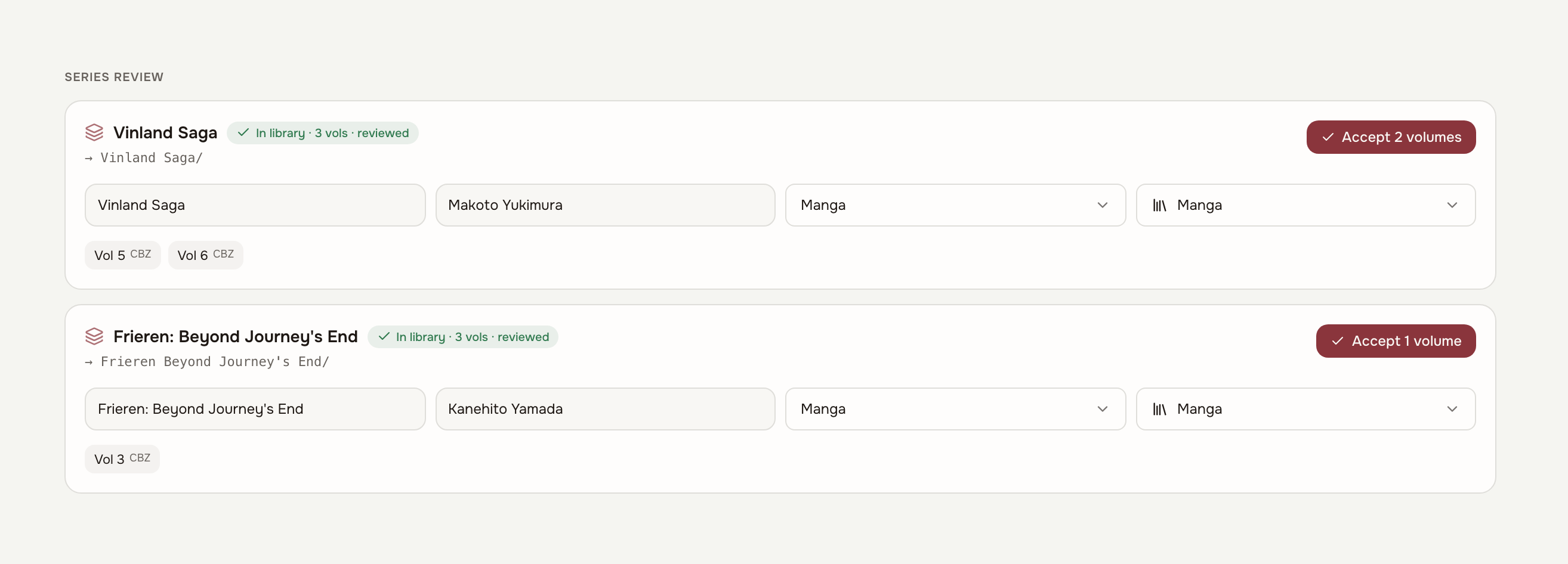
/datanow fails with a message that names the fix (PUID/PGID, chown, orTOME_SECRET_KEY) instead of a barePermissionErrortraceback onsecret.key. (#177)Bindery review now recognises series you already own: when a pending file's series matches existing volumes, the review proposes their exact spelling, author, book type and libraries (volumes a human has reviewed outvote unreviewed ones), ending series-name drift like "Frieren - Beyond Journey's End" arriving next to "Frieren: Beyond Journey's End". The proposal is always editable and only applies when you accept - unattended auto-import deliberately keeps its hands off.
Bindery review is now series-first: pending files group into series cards where name, author, book type and libraries are decided once for the whole group, volumes are confirmed as chips, and a destination-folder preview shows where the files will land. When the series already exists in the library the card adopts its exact identity and says so ("In library - 3 vols - reviewed"), so a drift-named batch files under the existing spelling in one click. Loose files keep the flat list and per-file review flow.
Changed
- Auto-import now applies external metadata in three confidence tiers instead of two: a strong match applies fully as before, a middling one only fills gaps in description, publisher and year, and a weak one is discarded entirely - previously a wrong match could still plant its ISBN, tags and cover on a metadata-poor file even when the title/author guard held.
Fixed
- Books accepted through the Bindery review flow now count as reviewed. Previously they were created with the flag unset, so a human-confirmed volume still appeared in the unreviewed queue and didn't count as authoritative when new volumes of the same series inherit their identity.
- "Sync now" in the TomeSync plugin (build 39) now pulls the server position before pushing, using the same forward/backward conflict strategy as book open. Previously it only pushed, so tapping it on a device that was behind overwrote newer progress from another device. (#175)
- The Home tab no longer flashes a false "Nothing in progress" empty state while it loads. Sections now hydrate behind skeleton placeholders and mount in one paint, cutting the cold-load layout shift from "poor" (CLS 0.27) to "good" (0.04) - content stops jumping down as data arrives.
- Cold starts no longer show a blank white page while the app downloads: the page ships a minimal theme-aware splash (your stored theme's background and the Tome mark), so slow connections and PWA updates get a branded loading state instead of a void - and dark-theme users no longer get a white flash.
- The UI fonts are now bundled with the app instead of loaded from the Google Fonts CDN. Air-gapped and privacy-conscious installs render the real typefaces with no third-party request.
- On phones, the Stats hour-by-day heatmap signals that it scrolls: edge fades now hint at the evening columns that were silently cut off after ~4pm.
- The Session Timeline tile no longer shows a wall of empty card below a sparse window - rows center vertically and a caption states how many active days the window covers.
- Stats charts wait for their tile to be laid out before rendering, fixing the skipped first paint and the "width(-1)" console warnings on every visit.
- Series pages no longer draw clipped "ghost" bars for unread volumes in the time-per-volume chart - unread volumes are a hairline tick on the baseline.
- Series with no cover art no longer fire a failing cover request on every grid render; the series list now points at the first volume that actually has a cover, or none at all.
- Home carousels (Continue Reading, Recently Finished, Recently Added, Pick up where you left off) show edge fades and an always-visible scroll chevron while covers continue past the edge, instead of silently clipping the last card - the fade alone was invisible over dark artwork, and at widths where the cutoff fell between two cards there was no signal at all.
- Tap targets that were far below the platform minimum are now comfortably tappable on phones: book-page breadcrumbs, prev/next volume arrows, the sidebar's "new library" button, the password-reveal eye, and the book-page action row.
- The Highlights search box gets its own full-width row on phones instead of shrinking to an unusable sliver next to the filter buttons.
- The Admin tab bar hints that it scrolls on phones (edge fades, and the active tab keeps itself in view) - eight of its thirteen tabs were invisible with no affordance.
- Bindery's refresh button keeps its label on phones; collapsed to a bare icon it sat next to the global sync indicator as two identical glyphs.
- Hardcover match cards no longer repeat the volume number when the title already carries it ("Berserk, Vol. 1 · Vol. 1").
- Upcoming releases shows the standard book placeholder instead of a bare gray square when a followed series has no cover art yet.
- Native dropdowns in the Admin area now match the app's input styling, and the narrow admin tabs (Scanner, Server) center like the rest.
- The three Home stat chips wrap as three even columns on phones instead of a ragged two-plus-one.
- The Stats empty state now mentions all three ways sessions arrive (TomeSync plugin, manual logging, KOReader import) instead of implying the plugin is required.
[2.2.0] - 2026-08-09
Security
- Updated
pdfjs-distto 6.2.108, clearing an arbitrary-JavaScript-execution advisory triggered by opening a malicious PDF (GHSA / CVE for PDF.js). This one is real in Tome: the web reader renders library PDFs with PDF.js in the app's origin, so a crafted PDF opened in the reader could run script with access to the session. Anyone hosting PDFs for multiple users should update. - Updated
fast-uri(build-time, via vite-plugin-pwa's workbox tooling) to 3.1.5, clearing a host-confusion advisory. Not reachable in Tome - it only parses our own build configuration duringvite build. - Updated
js-yamlto 4.3.1 in the frontend (dev-only, eslint's config loader) and the website build, clearing a quadratic-CPU advisory. Neither parses untrusted input. - Updated
postcssto 8.5.26 in the website build, picking up the completed fix for the source-map advisory partially addressed in v2.1.1. Build-time only, same as before.
Added
- New "Want to Read" reading status — the missing state between the wishlist and actually starting a book: owned, not started, queued next. Set it from the book page (next to Shelved), filter by it on the dashboard, and it self-promotes to Reading the moment real progress arrives from KOReader or the web reader. Series "continue" suggestions prefer a queued volume over a plain unread one, and the Library Completion stats tile shows a queued count. When an admin fulfils your wish, the arriving book lands on your Want to Read automatically — the intent that created the wish carries over (never overwriting a book you're already reading). Volumes arriving for a followed series do the same.
- Hardcover sync now covers Want to Read — in both directions. Queueing a book in Tome shelves it as "Want to Read" on your Hardcover profile, and books you shelve on Hardcover appear as Want to Read in Tome (for books Tome has matched to the Hardcover catalogue). Removing a book from the Hardcover shelf reverts it in Tome only when both sides had agreed on it; a book you're actively reading in Tome is never touched, and ratings and progress remain push-only as before. Shelving a book Tome doesn't have at all creates a wish on your Tome wishlist instead (with cover and author from the Hardcover catalogue), un-shelving it on Hardcover dismisses that wish again, and re-shelving it reopens the same wish. A shelved book that is already in the library but was never catalogue-matched adopts its match straight from the shelf entry and lands queued, instead of being skipped.
- Library Health now detects orphaned entries — books whose files no longer exist on disk (for example after files were deleted or moved outside of Tome). A new section lists them and a one-click "Remove Dead Entries" action cleans them up: dead file entries are removed and books left with no files at all are deleted entirely. Entries whose file still exists are never touched. (#165)
- Duplicates (Admin) gained a "Delete Others" action: keep the selected book and delete the other copies in the group, including their files on disk, with an inline confirmation step. Files that are missing from disk are now badged as such on each duplicate, so dead copies are easy to spot. (#165)
- New
POST /api/books/bulk-deleteendpoint deletes several books in one request with per-book permission checks and error reporting. The dashboard's multi-select delete now uses it instead of issuing one request per book, and failures are reported instead of silently skipped. (#165) - The Duplicates tab now works in one pass: pick the book to keep and an action (Merge, Delete Others, Dismiss) per group, then hit a single "Apply All" — instead of the screen refreshing and resetting your selections after every individual merge or dismiss. A summary reports what was applied and any failures. (#165)
Fixed
- The Hardcover shelf sync's first cycle could wrongly dismiss open series follows and user-created wishes whose metadata came from Hardcover (they share the "hardcover" source marker with wishes the sync creates). The shelf mirror now only ever touches wishes it created itself, and on the first start after updating, wrongly-dismissed follows and wishes are reopened automatically — admin-dismissed wishes stay closed.
- OPDS feed links now carry the correct public scheme behind a TLS-terminating
reverse proxy. The feed built its links from the request as the app server
saw it — plain http — so every navigation, download, and cover link came out
as
http://even when the catalog was reached over https. OPDS now resolves the public origin the same way the KOReader plugin URL and OIDC redirect do:TOME_PUBLIC_URLwhen set, otherwise theX-Forwarded-Protoheader. (#167) - KOReader plugin (build 38 / 1.11.1): popup menus — the series browser, Authors, Shelves, the Inbox and the TomeSync menu itself — could freeze on their first page when a full-screen home-screen plugin (such as bookshelf.koplugin) covers the file browser: page turns happened internally but the screen never repainted, and stale refreshes could leave blank white rectangles behind. The menus now repaint through their own window instead of the hidden file browser.
- "Select all" on the dashboard now selects every book matching the current filters, not just the ones the infinite scroll had already loaded — so bulk actions on large libraries no longer silently miss the books further down. (#165)
- Toggling "Group series" no longer occasionally shows duplicate books in the grid: an in-flight page request from the previous view could land after the toggle and append stale results onto the fresh list. Page requests are now cancelled when the view changes, and appends are deduplicated. (#165)
- Merging duplicates now actually transfers the removed book's files to the kept book. Previously the transferred file entries were silently deleted together with the removed book, leaving the files on disk untracked.
- Merging duplicates no longer carries dead file references over to the kept book: entries whose file is missing from disk are dropped during the merge instead of leaving the kept book with a file that errors on open. (#165)
[2.1.1] - 2026-08-01
Security
- Updated
react-routerto 7.18.2, clearing four advisories: an unauthenticated route-matching DoS (CVE-2026-55685), an open redirect via backslash in<Link>anduseNavigate, a constructor injection in SSR hydration, and an XSS in the RSC error handler. Only the open redirect is reachable in Tome - the SSR and RSC issues cover render modes Tome does not use, and the DoS is client-side in a static SPA, so it can only affect the tab it runs in. A fifth advisory (GHSA-qwww-vcr4-c8h2, CSRF bypass in RSC mode) has no 7.x fix at all and is equally unreachable from aBrowserRouterapp; it is left for a future major upgrade rather than pulled into a patch release. - Updated
postcssto 8.5.25, clearing a path-traversal advisory in source-map auto-loading. Build-time only - postcss reaches Tome through Vite and is not part of a deployed instance. - Updated
brace-expansion, a dev-only transitive dependency, to clear a denial-of-service advisory.
Build
- Release images now publish a major-version tag as well, so
ghcr.io/bndct-devops/tome:2follows the newest 2.x release without pinning a minor or patch. The existing:2.1,:2.1.1and:latesttags are unchanged. Thanks to @bl1nk for the contribution. (#163)
[2.1.0] - 2026-07-26 - "Palimpsest"
Added
- KOSync clients now pick up your Tome reading position (#156). The KOSync-compatible endpoint (stock KOReader sync, Readest, and friends) used to be an island: it only ever served what a KOSync client itself had pushed, so progress from the web reader never reached those apps. The sync pull now answers with the newer of the two - the last KOSync push or Tome's own position (web reader or TomeSync device) - at percentage precision, since KOSync locators and web CFIs aren't convertible. The bridge is strictly read-only: KOSync pushes still never move positions on devices running the TomeSync plugin.
- KOSync documents auto-link by file hash. Linking a synced document to its Tome book no longer depends on the OPDS-download heuristic: any file that came from Tome is recognised by its KOReader partial-MD5 and linked automatically on the first push or pull. The OPDS heuristic remains as a fallback for files Tome has never seen.
- Manual sync linking in the UI. When a KOSync client has synced a document that isn't attached to any book, the book page offers a small "Link KOReader sync" picker - no more calling the API by hand.
- Imported KOReader history shows up as sessions - and single sittings can be deleted. Reading synced from KOReader's statistics (including history from before Tome existed) used to count toward the totals but never appear in Recent Sessions or the per-book session list, so a book could claim "1 session" over an empty list and an accidental open was impossible to remove without wiping the book's whole imported history. The session lists now include imported sittings (marked "imported", grouped the same way KOReader groups sessions), each deletable on its own; the book page's session count matches the sittings that count. Imported sittings can't be trimmed - KOReader's own idle-capping already applies. On books with imported history, the plugin's live device sessions describe the same reading a second time, so they are excluded from the totals - but they stay in the list with a "not counted" label rather than disappearing. An info popover next to the session lists explains all of this in place.
- Click a day in the book page's Activity chart to manage that day's sessions. Each bar opens a popup with the sittings that started on that day - trim or delete right there instead of scrolling the full session log to find the one stray entry.
- The Habits tab's session timeline now draws imported KOReader sittings too, so device reading on stats-synced books appears in the ribbon instead of leaving those days blank. The superseded live device sessions are left out of the drawing - the same reading would otherwise paint twice.
- Clear imported history per book. The Reading intensity panel on a book page grows a small trash action that removes the current user's imported KOReader page data for that book — the manual escape hatch for mixed cases the automatic repair deliberately leaves alone. Web and manual sessions are unaffected, and reading the book on a device again re-imports from there on.
- Runaway reading sessions are over (KOReader plugin, build 37). A device that never actually sleeps — a cover that fails to suspend it, or a reader who fell asleep mid-chapter — used to book the whole wall-clock span as reading, turning a 15-minute evening into an 8-hour session (#150). The plugin now counts active reading the way KOReader's own statistics do: each gap between page turns is credited at most an idle cap (10 minutes by default, configurable in TomeSync settings, including off), and the session ends at the last page turn rather than whenever the device finally slept.
- Trim a session instead of deleting it. Sessions that idled — real reading followed by hours of nothing — can now be shortened from the Recent Sessions list: a scissors button opens a small editor, pre-filled with a suggested duration computed from the session's page turns at your own median reading pace, so the reading stays and the idle tail goes. Suspicious sessions (implausibly long, or minutes per page turn) are marked with a warning icon and the list can sort longest-first. The same session list lives in two more places: the per-book time table on the Library stats tab expands per book, and every book page grows a collapsible "Sessions" section under Reading Stats — so sessions stay editable even on a stats dashboard with those tiles removed.
- A heads-up when a runaway session syncs. Sessions arriving from older plugin builds still get sanity-checked on the server: an implausibly long one raises a bell notification pointing at Reading Stats, so a bad night never silently distorts your numbers.
Fixed
A seconds-long accidental open synced from KOReader history now shows up in the session lists and the Activity day popup so it can be deleted. Such blips are below the noise floor for session counting (a 7-second page flip is not a sitting) and were filtered out of the lists entirely - but their seconds still drew an Activity bar and set "last read", so the one entry people most want to remove was the one entry that never appeared, and its day popup claimed "No sessions recorded".
KOSync progress pushes now follow the same read-status rules as every other sync path: finishing requires 99% (was 95%), completion is sticky (a re-read no longer drags a finished book back to "reading"), and the finish date is recorded.
Imported KOReader reading history can no longer land on the wrong volume of a series (#152). When a volume read on the device was missing from the Tome library, the history importer's title matching could confidently attribute its entire reading log to a sibling volume — hours of sessions and page data on a book never opened. The matcher now treats a parsed volume number as authoritative: a candidate claiming a different volume is never matched, half-volumes (2.5) resolve exactly instead of truncating, and French-style "T2" tome numbering is understood. History for a volume Tome doesn't own is parked until the book exists rather than guessed onto a lookalike.
On update, previously mis-imported history heals itself: stored matches are re-verified against the fixed rules on startup, ghost page data whose book has no other import source is removed, the device re-syncs its history on the next connection, and a notification explains what happened. Books where wrong and genuine history are mixed are left untouched and flagged instead.
Chart tooltips on Reading Stats no longer detach from the cursor or hide behind neighbouring tiles (#151). The activity heatmap, the hour-by-day heatmap, and the timeline ribbon all rendered their hover tooltip inside the dashboard tile, where the grid's CSS transform re-anchored it and clipped it under adjacent cards; tooltips now render at the document root and follow the mouse everywhere.
[2.0.0] - 2026-07-19 - "Omnibus"
Added
- Share a shelf, a series, or a single book — metadata only, by design. Shelves (share icon in the sidebar), series (share icon on the series page), and individual books (Share button on the book page) can each mint a revocable public link: a clean read-only page with covers, titles, tags, descriptions, your ratings and highlights — and your reading of it: time, reading days, finish dates, and a little day-by-day activity strip. It never exposes files — no downloads, no reading, no route to book content at all; links are unguessable, marked noindex, and die the moment you revoke them.
- Reading Timeline — your reading life on one ribbon. A new Timeline tab on Reading Stats draws every book you've ever read as a bar in time: one lane per series (named in a frozen rail on the left), volumes as numbered bars spanning first to last active day, and the intensity of each day's reading shaded inside the bar. Lifetime data, including imported KOReader history, reconciled the same way as the rest of stats. Zoom from a year-at-a-glance down to month detail, hover any bar for the cover and totals, click through to the book. The tab renders full-bleed — edge to edge, viewport-tall — and the ribbon is also available as a regular tile in the dashboard gallery.
- Sync on suspend (KOReader plugin, build 35). Two new opt-in settings make morning stats current without waking the device (#128). "Sync on suspend" catches up anything still pending — sessions, ratings, and the reading-history backfill — when the device goes to sleep, provided WiFi is already connected. "Aggressive sync" additionally turns WiFi on first for devices that sleep the radio (e.g. PocketBook), letting the system power it back down as the device suspends. Everything on this path is queue-or-resume safe: if the device sleeps before the sync finishes, it completes on the next connection. Reconnecting WiFi now also catches up the reading-history backfill (previously launch-only) and flushes pending sessions even before a book is opened.
- Shelves on your device (KOReader plugin, build 36). The TomeSync series browser gains a Shelves entry: your saved shelves listed with live counts, each drilling into the same book list as a series — download per book or all at once, read-status markers included. Shelf filters resolve server-side (search, series, author, tag, format, language, library, reading status, rating).
- Sync closed books (KOReader plugin, build 34). A new TomeSync menu action walks the device for books the plugin has never synced — read before Tome existed, sideloaded, or opened under another launcher — matches them against your library by content hash, and adopts each one's status, rating and reading position from its KOReader sidecar. Adoption only fills what Tome doesn't already have: it can never overwrite live sync state or your own curation. The sweep is resumable (interrupting it loses nothing) and cheap to re-run — books are skipped until their sidecar actually changes. Matched books also become fully synced from then on, positions, highlights and all.
- Search your library from the device (KOReader plugin, build 33). The series browser gains a "Search library…" entry: submit-based free-text search over title, author, and series, with your last searches one tap away. Results open the same drill-down list as a series — tap to download, hold to set read status.
- Browse by author on the device (build 33). A new author axis in the series browser — the natural way into standalone books, which previously all hid behind the single "No Series" bucket. Downloads file each book by its own series/author identity, exactly like the web.
- Set read status from the device browser (build 33). Hold any book row in a series, author, or search list to mark it unread / reading / read on the server — no need to open the book. The lists also show each book's current status alongside the existing "on device" marker.
- Position pull strategy (KOReader plugin, build 32). What happens on book open when the server position differs from the device is now configurable, like stock KOSync: "Server position is ahead" and "Server position is behind" each offer Ask before jumping / Jump automatically / Do nothing (TomeSync settings). Defaults keep the historic behavior — forward jumps happen silently, backward jumps never — and the ask-dialog is deferred a moment after open so it can never swallow a "on book opening" profile the way the old layout-reset bug did.
- Position history — undo a bad sync. Tome now keeps a short log of every meaningful reading-position change per book (device, web, manual — the idle heartbeat doesn't spam it). A history button on the book page's Reading Stats header lists them, and any entry can be restored as the live position with one click — including explicitly un-finishing a book that a device falsely jumped to 100%. Devices pick the restored position up on their next sync. The classic sync horror story is no longer unrecoverable.
- Import your Goodreads or StoryGraph history. Settings → Import reading history takes either service's CSV export, matches it against your library (ISBN first, then title/author), and shows a full preview before anything is written. Importing only fills gaps — statuses, ratings, reviews, and finish dates you already have are never overwritten — and "to read" shelves are skipped. Pre-Tome reading finally lands on the lifetime timeline.
- Push notifications to ntfy, Gotify, or any webhook. Settings →
Notifications lets each user add outbound channels; every in-app
notification (wish fulfilled, new volume detected, reading goals) is
pushed the moment it happens instead of waiting for the next visit. Each
channel has a test button, can be paused, and tokens are stored
server-side only.
TOME_OUTBOUND_NOTIFY=falseswitches the whole feature off; nothing is sent unless a user configures a channel. - "Time left in chapter" in the web reader. The reader footer now shows "~12 min left" beside the chapter name, computed from the book's chapter map and your own measured reading pace (a sensible default until you have reading history). Quietly absent for books without a chapter map or word count.
- Edit highlight notes from the web. The Highlights page and the book page's Highlights & Notes section can now edit (or add) the note on any highlight — including ones made in KOReader — not just delete them. Edits win on your devices at their next sync, exactly like an edit made on another device.
- Command palette. Press Cmd+K (Ctrl+K) anywhere to jump straight to a book, series, author, or page — full-text book search with covers, ranked series/author matches, and quick navigation, all keyboard-driven. The header search box hints it, and it's listed under "?" shortcuts help.
- Search previews everywhere. On Stats, Highlights, Wishlist, and the other section pages, typing in the header search now shows a live dropdown of top matches (Enter still opens the full filtered grid) — previously those pages gave no feedback until Enter.
- Upload knows what you already have. Files added to the upload dialog are hashed in the browser and checked against the library before anything is sent — exact duplicates get an "already in your library" note with a link to the existing book and are skipped, instead of uploading megabytes just for the server to silently discard them.
- Admin → Covers: cover-quality audit. Lists books whose covers are missing, unreadable, or genuinely low-resolution (real thumbnails, not standard-source covers), with sizes shown. Books with no cover at all offer a one-click auto-fix from the cover search (nothing to downgrade); low-res ones deep-link to the book page to pick a better candidate by eye.
- One-click instance backup and staged restore. Admin → Server gains an Instance backup card: download a consistent snapshot of everything Tome knows (database + covers + manifest; book files stay on disk), and restore one by uploading it — the restore is validated, requires typing RESTORE, and applies at the next server restart so it never happens under a live database. The previous database is kept alongside as a safety copy.
- "What's new" after an upgrade. The first visit after the server moves to a new release shows a one-time panel with that release's notes, straight from the changelog — so features stop shipping invisibly. Dismiss it and it stays gone until the next release; fresh installs never see it.
- Update indicator for admins. Settings → About quietly shows "vX.Y.Z
available" (linking to GitHub releases) when a newer release exists, via a
daily-cached server-side check. Set
TOME_UPDATE_CHECK=falseto disable the lookup entirely — nothing else phones home. - Timeline: the tooltip now answers at day level. Hovering a bar resolves the exact day under the cursor — "15 May · 22m", or "no reading" on a gap day — alongside the book's totals. The day data was always drawn as tick intensity; now it's readable.
- Timeline on phones. The series rail narrows so the ribbon keeps most of the screen, and bars are tap-friendly: the first tap shows the details tooltip, a second tap opens the book (tapping empty space or scrolling dismisses it). Previously any tap navigated away immediately.
- Highlights page polish. The deferred cluster from the original
commonplace-book release: an only-notes filter (show just the highlights
carrying your own notes — composes with search and on-this-day), a real
file export (download all matching highlights as a Markdown file, next to
the existing copy-to-clipboard), keyboard shortcuts (
/search,Escclear,ccollapse all,nonly-notes,eexport — listed in the?help), and a shuffle button on the Home tab's highlight spotlight that re-rolls to a different quote. - Time per chapter. Book pages now show where your reading time went chapter by chapter: the book's table of contents is extracted at ingest into device-independent chapter boundaries, and KOReader per-page reading data is mapped into them — robust to font/margin changes, since every page record is interpreted against its own pagination. Renders on the book detail page next to the reading-intensity curve whenever both a chapter map and synced page data exist. Existing libraries get chapter maps via the Admin → Word Counts backfill, which now also extracts chapters (and intrinsic page counts, below) in the same pass.
- Intrinsic page counts for fixed-layout books. PDFs and comic archives now store their real page count at ingest (EPUB deliberately doesn't — reflowable pagination is not a property of the book). Backfilled by the same admin job.
Fixed
- The audit log covers new features again. A coverage pass wired audit entries into everything that had shipped without them: instance backup download and restore staging/cancel/apply, OPDS PIN and KOReader plugin key lifecycles, book type and series/arc curation, Hardcover account link/unlink, notification channels (never the token), reading-history imports, cover changes, bulk downloads, session deletes, highlight deletes, and position restores. Device sync telemetry and personal micro-writes stay deliberately unlogged.
- Stats on phones: dead gap and misaligned range picker. The Stats page header paid the notch inset a second time inside the app shell (the top bar already covers it), opening a large empty band between the top bar and the page title on the installed app; and when the timeframe picker wrapped below the title on narrow screens it stayed floated right, reading as misaligned. The header now sits flush and the picker takes a full, left-aligned row.
- The mobile app no longer feels like a draggable website. On phones the page content could be dragged sideways and rubber-banded (on iOS the Focus view's scaled cover fan still counted its full unscaled width as scrollable overflow), the viewport bounced past its edges, double-tap zoomed, and a long press selected interface text — classic browser-tab behavior. The app now clamps content to the viewport width, suppresses edge bounce and scroll chaining, removes double-tap zoom (taps fire immediately), disables text selection on interface chrome for touch devices (text fields and the reader keep it), and sizes the shell to the real visible viewport instead of overhanging behind mobile browser toolbars.
- The notifications panel no longer renders behind sticky page content. The top bar sat at the same layer as page-level sticky toolbars (and below the new timeline axis), so the open notification dropdown was cut by the Stats toolbar. The top bar now stacks above content-level sticky elements.
- Chapter maps now extract from EPUB2 books. Older EPUBs keep their table of contents in an NCX file rather than an EPUB3 nav document; chapter extraction ignored the NCX, so classics and older rips silently produced no Time-per-chapter data. Extraction now falls back to the NCX whenever the nav yields nothing — re-run Admin → Word Counts to pick up the affected books.
- TOC-less EPUBs no longer re-queue in the Word Counts backfill forever. Books whose files genuinely have no usable table of contents were re-parsed on every run because "done" was inferred from having chapter rows; a dedicated attempt marker now records "tried, nothing there" once.
- A fast server clock can no longer silently swallow highlights (build 32). Highlight edits and deletes made in the web reader are stamped with the server's clock; on a device whose clock runs behind (UTC container vs local device time), those stamps landed in the device's future and outranked every later local change — a re-highlight after a web delete just vanished until the clocks crossed. The plugin now stamps its wall-clock on every highlight sync and the server shifts the stamps it minted itself into that device's clock frame, both when comparing and in what it returns; the plugin additionally refuses to store any stamp from the future. Older plugins keep the previous behavior.
- The TomeSync plugin no longer bloats KOReader's global settings file
(build 32). Its data tables (book map, pending sessions and ratings, sync
baselines, repair aliases) — which grow with your library and were parsed by
KOReader at every boot — moved into a dedicated
tomesync_state.lua, migrated automatically and crash-safely on first launch. State for books no longer on the device is pruned; pending queues are never pruned. - The plugin's series list no longer runs one query per series. Loading the series browser was an N+1 that scaled with the library; it's now a single query with the same response.
- The Highlights "copy all as Markdown" export never worked. It requested more highlights than the API's page cap allowed, got a 422, and failed without any feedback. The cap is raised, the export stays under it, and a failure now shows an error toast instead of silently doing nothing.
- Bindery no longer invents a series from the filename. Prose ebooks named
Title 5.epubused to come out of review with their series set to their own title (the bare-number manga-chapter heuristic misfiring on novels); the real series name in(Series Book N)parentheticals — the common Amazon/Calibre naming — was stripped as noise; and the metadata embedded in the file itself (calibre:seriesetc.) was extracted but never reached the review form. All three are fixed: the filename parser now understands(Series Book N)/(Series #N)markers and theNN. Title - Author (Year)layout (filling the author field too), bare trailing numbers on EPUB/PDF no longer fabricate a series, and the review form pre-fills from embedded metadata with the same "file beats filename" precedence auto-import has always used.
[1.8.0] — 2026-07-05 — "Spine"
Added
- Hardcover sync. Link your personal Hardcover account in Settings and Tome
pushes your ratings and reading progress to it — one-way, opt-in, and nothing
is ever deleted on Hardcover. Ratings go out shortly after you change them;
progress goes out in batches as print-edition pages (
round(pct × pages)), and books whose edition has no page count sync status-only. Matching is ISBN-first with a strictly-guarded, volume-aware title+author search fallback that prefers the community's record over catalogue stubs. A dedicated Hardcover page (sidebar) shows every synced book with its cover and exact matched record, filterable by state, with per-book actions: pick the right record manually (search modal), re-match, or exclude. Matched books also link to their Hardcover record from the book page's Details grid. Tokens are stored encrypted, and when Hardcover's annual January-1 token reset hits you get a notification to re-link. Server kill switch:TOME_HARDCOVER_SYNC_ENABLED(the existingTOME_HARDCOVER_TOKENstays metadata-only). - Half-star ratings. Book and series ratings now take 4.5-style values — the star widgets select halves by clicking the left or right side of a star. Existing whole-star ratings are untouched. KOReader's native rating stays whole-star: the plugin (build 31) rounds a pulled half-star for the device without ever pushing the rounded value back over your half-star.
- Page numbers on the book page. Once a book is matched on Hardcover, the progress bar shows a font-size-agnostic "p. 142 of 384" from the print edition's page count alongside the percentage.
Security
- Quick Connect codes can no longer be brute-forced into a login. Polling a code used to require nothing but the code itself — six characters, guessed fast enough, handed out a full login token once the code was authorized. The device that requests a code now also receives a long random poll secret, and only that pairing can collect the login; a guessed code gets the same "not found" as a nonexistent one. The short code is still all you type on the already-signed-in device — nothing changes in the flow you see.
- A KOReader sync registration can no longer claim your account. The KOSync registration endpoint (which KOReader's "Register" button calls without any authentication) used to attach the new sync credential to whatever Tome account had the same username — so anyone who knew a username could register it first and have their reading activity land on that account. Device-side registrations now start unlinked; connecting sync to your account is done signed-in via Settings → KOReader Sync, which also reclaims a squatted name by overwriting its key.
Fixed
- Reorganize is crash-safe and works across filesystems. Library Health's one-click reorganise used to move every file first and write the database once at the end — a crash mid-batch left every already-moved file unfindable (and unhealable, since the repair tool starts from the stale database path). Each move is now committed individually, so an interruption loses nothing. Moves also switched to a copy-safe primitive, so a library spanning mounts (mergerfs, NFS, a series folder symlinked to another disk) no longer fails per-file. And when a file's canonical slot is already occupied by a different file, reorganise reports a conflict instead of silently renaming to "Title (2).epub" — a suffix the next health check would flag again, renaming it to (3), (4)… forever.
- Deleting a book can no longer leave a permanent ghost row. Files were removed from disk before the database delete committed; a crash in between kept the book in the library with nothing behind it — every download 404ed and no scan could heal it. The order is now inverted: the row goes first, and files are removed after (if that half is interrupted, the next scan simply re-imports the orphaned files).
- "Purge empty folders" no longer eats Syncthing markers. A folder whose
contents were all hidden was treated as junk and emptied — which deleted
.stfolder(halting the whole Syncthing share with "folder marker missing") and could delete versioned user files in.stversions. The purge now only removes recognised OS droppings (.DS_Store,._*AppleDouble files,Thumbs.db,desktop.ini); anything else — including any hidden directory, which previously crashed the endpoint mid-walk — means the folder is kept. The same whitelist governs the folder cleanup after a reorganise, which also no longer errors out after the moves have already succeeded. - A sideloaded book can no longer hijack another book's reading progress.
When KOReader opens a file Tome never served (a sideload, or a copy renamed
on the device), Tome matches it to a library book by filename as a last
resort. That matcher was too eager: a short title like "It" matched
The Italian Job, a
Foo v2filename landed on a standalone "Foo", and a year in the name (… - 1984 - …) was misread as "volume 1984". Any of these silently wrote one book's position, sessions and highlights onto another. Matching is now strict — whole-word title matches, a minimum length before a substring counts, and a volume number in the filename must line up with the book's actual volume — and when it can't be sure it declines (the device just keeps tracking locally) rather than guessing. Books downloaded from Tome are unaffected: they match by content hash, not by name. - Reading position no longer flaps between two values. The position table had no uniqueness guard, so a device sync and a web-reader save landing at the same moment could each create a row for the same book — after which reads picked an arbitrary one and the progress appeared to jump back and forth (and stats double-counted it). There is now one position per book, both writers update it in place, and a one-time cleanup collapses any existing duplicates to the most recent.
- Marking a book "unread" on the web now sticks on your device too. The reset cleared the web side but left the synced position untouched, so the next time the book opened on KOReader it jumped back to where you'd been and flipped itself to "reading" again. Marking a book unread now also clears the synced position.
- Hardcover sync could pin a translation's or the audiobook's edition. Publishers reuse one catalogue across translations and audio, so a stored ISBN sometimes names the German edition (or the audiobook) of the right book — your Hardcover profile then showed the German cover and title. Edition selection is now language-aware and audio-averse everywhere a match is made (ISBN, search, and manual pick): the book match is kept, but the pinned edition must agree with the book's language and prefers text editions with page data. Existing wrong matches repair via the Hardcover page's per-book "Re-match".
Changed
- Dark themes got a contrast pass. Hairline borders were sitting at an alpha where most panels had none to speak of; they're a step stronger now across Dark, Ember and Black, secondary text is brighter, and the rosewood accent carries a little more color so buttons and progress bars don't read grey-brown. Light and Amber are untouched.
- The Home dashboard has one primary surface now. The quick-stats strip lost its box (the figures sit on the page), the right rail became a quiet tinted panel, and the content column is the single bordered, elevated card — before, all three wore identical chrome and nothing led the page.
- Rating stars stepped back into the palette. The gold is a notch quieter in every theme — a shelf of five-star rows was the loudest color on the page.
- Top bar: quieter search, louder Upload. The search box no longer wears a fill and a border at rest (it sharpens on focus instead), and Upload — the bar's one real action — is now a solid accent button rather than another neutral chip.
- The sidebar recedes like the rail. It takes the same quiet tint as the Home right rail, framing the content column instead of sharing its background, and empty libraries no longer show a ghost "0" count.
- The Home Reading Log now reads like a log, not a ticker tape. Back-to-back sessions of the same book collapse into one row ("3 sessions · 1h 08m"), entries group under day headers (Today / Yesterday / date), each row shows the session's clock time instead of repeating "yesterday" down the column, and rows link to the book.
- Less badge noise on Home. The format badge (EPUB/CBZ) no longer stamps every cover in Continue Reading / Recently Finished / Recently Added — on a one-format shelf it said nothing ten times over. Library grids keep it, since that's where formats actually differ.
- Focus mode loads into a skeleton of itself — a cover-and-text placeholder in the hero's real layout — instead of flashing a bare centered "Loading…" and teleporting the page in afterwards.
- Reading DNA bars no longer masquerade as sliders. The round thumb-on-track marker (which begged to be dragged) is gone; each trait now renders as a center-origin gauge filling toward the pole you lean to.
- The top-bar sync chip identifies itself. The anonymous colored dot next to "12h ago" is now a sync icon, tinted by how fresh the last KOReader sync is (green = minutes ago, amber = recent, grey = stale).
- Grouped library counts say "titles" instead of "entries" — with Group series on, "31 entries" read like a book count and never matched one; a series stack plus standalones are 31 titles.
Added
- The KOReader series browser got a quality pass (plugin build 29). Big downloads show live progress (percent of file size) instead of sitting mute; a failed list-load or download offers Retry instead of a dead-end popup; a single fresh download asks "Open now?"; volumes you already have are marked "on device" in the list; and every request now has tight network timeouts, so a dead server stalls the reader for seconds, not a minute. The position heartbeat also moved off the page-turn path — it fires when the reader is idle, never while you're turning.
- KOReader files are now recognised by content, not just by name. Tome records the KOReader-style hash of every file it scans and every copy it serves, and the plugin (build 27) sends the open file's hash when it asks "which book is this?". A book you renamed or moved on the device — or sideloaded from the same source — now resolves exactly, with the careful filename matching kept as fallback. The reading-history import uses the same hashes first, so device history matches your library deterministically before any title guessing.
- Session counts from imported device history are real sessions now. The stats reconciliation used to approximate "one session per book per day"; it now splits device reading at 30-minute gaps, the same way sessions are actually experienced. On a real multi-year device history that corrected a one-third undercount (320 → 470 sessions); reading time and page counts are unchanged, and a read across midnight counts once, on the day it began.
- File books into libraries straight from the Bindery. The review form (and the batch "apply to all" bar) now has a Libraries picker like the one on the book page, so an accepted book lands in the right libraries in one step instead of needing a second pass through each book (#103). There is also an "Add to libraries" picker right in the Bindery toolbar: set it once and the next Quick Accept or Review run files everything into those libraries (it resets afterwards, so the next batch starts clean). The book type's own library is still added automatically.
- Batch review got real per-file metadata matching. The suggestions panel used to silently search for the first file only; now clicking any file row targets the panel at it (the active row is highlighted), and a new "Match all" button fetches and applies the best match to every file in one go — trust the matcher, eyeball the rows, Accept All. The batch "Apply to all" buttons also confirm with a toast now instead of applying silently.
- Create highlights in the web reader — they appear on your KOReader. Select text while reading on the web, pick a colour, and optionally attach a note; the highlight paints immediately and syncs to your devices. Since the web reader and KOReader address text differently, a new highlight carries a provisional identity until your device next syncs the book: the plugin locates the passage natively and "adopts" it as a first-class KOReader highlight (build 25 / 1.7.0). You can also edit notes and delete any highlight from the tap-card — including ones made on the device — and the change wins on every device at its next sync. A passage the device can't locate stays web-only rather than landing on the wrong words.
- Your KOReader highlights now show up inside the web reader. Open a book on the web and the passages you highlighted on your device are painted right in the text, in their KOReader colours; tap one to see the full passage, its note and when you made it. Under the hood each highlight is re-anchored by its own text (device anchors don't translate to the web reader's engine), so a highlight whose passage can't be located — say it spans a page-break element — simply doesn't paint rather than pointing at the wrong words. Highlights load lazily per chapter, so big collections don't slow the reader down.
- Follow a series — get told when a new volume is out. A new opt-in release
detector (set
TOME_RELEASE_DETECTION=true; needs your Hardcover token) lets members follow a series: Tome polls Hardcover on a schedule (daily by default,TOME_RELEASE_CHECK_INTERVAL) and when the tracker's latest volume number grows past what it saw at follow time, you get a bell notification — and an email when SMTP is configured. Following starts silent: it primes at the series' current latest volume, so following a 27-volume series doesn't fire 27 alerts. Follows live alongside your wishlist (/api/wishlist/follow,/api/wishlist/follows), and admins can trigger a check on demand. - Focus mode on the Home page. A new minimalist Home view that surfaces the one book you're most likely to pick up next — your most-recently-synced in-progress title — as a large cover with the upcoming volumes of its series fanned behind it in a rotating "coverflow" display. Alongside it: the series, your progress and where you last synced from, a one-click Resume reading, and a quiet Currently reading strip to switch the spotlight to any other in-progress book. Clicking the cover or series name jumps to the series. Toggle between Focus and the full Dashboard from the Home header; your choice is remembered.
- Your Reading DNA. The Home dashboard shows a reading-personality card — an archetype (e.g. "Night-Owl Epic Specialist") distilled from a few traits like when you read, how long your sessions run, and how widely you range across the library. On Reading Stats it's also available as a Reading DNA tile — add it from Add tile under Habits; the Home card's "Full breakdown" link points there.
- A richer reading log on every book. A book's Reading Stats now show more of its story: a progress line traced over the activity bars so you can see how far you got on each reading day, a momentum indicator comparing the last week to the one before, a "Where you read" breakdown splitting your time across the web reader, KOReader and your devices, and a Finished date once you mark a book read. You can also log a session by hand — handy for paper reading or a device that wasn't synced — and export a book's reading log to CSV or JSON. Small "i" hints explain the progress and reading-intensity charts in plain language.
Fixed
- Sidebar Libraries/Shelves no longer flicker when switching pages. Every page (Home, Stats, Highlights, Wishlist, Bindery) refetched the lists from scratch on navigation, blanking the sections for a beat. The lists are now cached across page mounts and refreshed silently in the background.
- Re-downloading a book no longer deletes its synced highlights. A fresh copy of a book starts with an empty annotation sidecar; the sync used to read that as "the user deleted every highlight" and pushed the deletions to the server (verified live — one re-download tombstoned the book's highlights everywhere). The sync now recognises a sidecar it hasn't seen before and re-applies the server's highlights instead. Deleting highlights on the device still propagates exactly as before.
- Highlights from another device can no longer land on the wrong words. Before painting a highlight that was made elsewhere, the plugin (build 28) now verifies the stored position actually reproduces the highlighted text on this copy of the book. When it doesn't (a re-downloaded copy can shift positions), the passage is found by its text and painted there — while the original device's position stays untouched on the server, so the two devices can't fight over it. Text that can't be located is skipped rather than guessed. Notes edited on a repaired highlight still sync everywhere.
- Book matching no longer trusts a stale device checksum. KOReader's sidecar hash can be inherited from a different copy of a book (metadata restores); the plugin now hashes the actual file when identifying it, which the emulator tests caught producing wrong lookups.
- The KOReader reading-history import no longer risks out-of-memory on big histories. The plugin used to load every page-stat row since the last sync into memory at once — tens of thousands of rows on a device with years of reading — and resend the full book list with every upload chunk. It now reads and uploads in small windows (verified against a real 34,000-row device database), sends each chunk only the books it references, and an interrupted run still resumes exactly where it left off. Plugin build 26; update from TomeSync's "Check for updates" as usual.
- Annotations from another device can no longer break a book opened as a PDF or comic. The cross-device highlight merge only knew how to rebuild annotations in the EPUB engine's format; on a PDF/CBZ it would still plant incoming ones as broken highlights — positions stored as text where the renderer expects page numbers and rectangles. The plugin (build 26) now reconstructs an annotation only when the receiving book can actually draw it; everything else stays safely in Tome instead of corrupting the book's annotation list.
- The series-page action buttons line up again when you follow a series. The "Next: Vol N" caption under the Following button used to push the button out of line with Resume / Mark all read / Manage; it now hangs below without shifting anything.
- Metadata fetching got a deep overhaul. The same book returned by two sources used to eat two of the five result slots — each copy partial (Hardcover knows series but not language; Google the reverse). Duplicates are now merged across sources into one complete candidate, results are ranked by the same relevance score everywhere (the right volume of a series now beats the wrong volume from a "better" source), and every path — the fetch dialog, bulk review, bulk apply, Bindery, auto-import — agrees on what the best match is. Rate limits are handled honestly: sources are retried once with a pause, and when one is still throttled the dialog says so instead of pretending the book doesn't exist. Three more sharp edges filed down: auto-import no longer renames a book on a low-confidence match (it fills blanks instead), applying fetched metadata no longer wipes your hand-added tags, and bulk fetching paces itself instead of firing a hundred parallel searches that tripped the very rate limits above. A cross-check against realistic library shapes (manga volumes, light novels with series-only titles, wrong-edition ISBNs, foreign editions) caught four more: Hardcover's series and publisher were never actually filled in production (an id-type mismatch made that lookup a silent no-op since it shipped — fixed), foreign-language editions no longer merge into (and poison) the English candidate, light novels no longer match the manga adaptation of the same series (search is edition-aware now), and a stored ISBN that points at the wrong edition — damage the old auto-apply itself caused — no longer monopolises the results. Edition awareness also understands custom book types now ("Webtoons", "graphic_novel", …), not just the seeded four.
- AniList as a manga metadata source. The existing sources are prose-first and often know nothing about a manga volume beyond its title. Books with a sequential-art type (manga, comics, webtoons, custom equivalents) now also query AniList (no API key needed): it appears as its own candidate with the series blurb, genres, staff and cover, and its series-level description, author and genres back-fill volume-level hits from the other sources that are missing them.
- Scribe:
/scribe audit editions. A new audit check finds books whose stored ISBN belongs to the wrong edition of their series (a light novel carrying the manga's ISBN — damage older auto-apply versions could cause, which then poisons every later fetch) and proposes the correct edition's ISBN, publisher, year and description for approval. - Repeat searches are served from a short-lived cache. Identical source queries within 15 minutes (re-opening the fetch dialog, bulk-fetching a series whose volumes share a series-level lookup) no longer re-hit the external APIs — less rate-limiting, faster results. Concurrent duplicates (a bulk fetch firing the same lookup for every volume at once) share a single outbound request instead of racing past each other.
- No more flicker of the Follow UI on instances without release detection. The Follow button, Following section and Upcoming-releases card rendered optimistically and hid after the server said the feature is off — a visible flash on every page view. They now stay hidden until the check resolves, and a disabled verdict is remembered for the session.
- Bindery is back in the mobile menu. The mobile drawer never got a Bindery link when the desktop sidebar did, so on a phone admins could only reach it by typing the URL (#101). It now sits under Wishlist with the pending-file count.
- The mobile drawer got a tidy-up. The five theme choices no longer stack as full-height rows — they are one compact "Theme" row of icon buttons — so the account section fits without pushing the navigation off screen.
- Deleting a highlight from the web now sticks, even for a highlight you just made. The deletion marker was stamped with the server's clock, but compared against the device's local wall-clock — so with a UTC server and a device in a later timezone, deleting a recent highlight produced a marker that looked older than the highlight itself, and the device quietly kept (and could re-upload) it. The marker is now stamped no earlier than the highlight's own timestamp, so the deleted copy always loses the tie while a deliberate re-highlight still wins. Also, the "N from M books" counter on the Highlights page no longer under-counts books after deleting when more highlights are still unloaded.
- Hand-logged and web-reader sessions no longer vanish on device-synced books. On a book with imported KOReader history, the "history wins" rule replaced all other reading records — so logging 30 minutes of paper reading appeared to do nothing, and web-reader time was invisible. The rule is now per source: the imported history replaces only the device's own live sessions (the same reading, recorded twice), while web-reader and manual sessions add on top — everywhere, from the book page's reading log down to the dashboard totals and streak days. A pleasant side effect: "Where you read" now actually shows the web/device split for mixed readers, and the progress line can draw through web-reading days on a device-synced book. Manual logging also got sturdier: a failed log now shows an error instead of silently resetting, absurd inputs (negative pages, a duration over 24h) are rejected instead of crashing, and a timezone-annotated start time is converted to UTC instead of having its offset ignored. The Activity chart also earned a real time axis: days without reading now appear as gaps instead of active days being stretched edge-to-edge (two adjacent bars could silently be a month apart), the "Where you read" bar separates its segments with a hairline seam, and the admin "All readers" line stays hidden when the only reader it would describe is you.
- The "Finished" date is now the date you finished. It used to be the last time anything touched the status row — rating a book in March that you finished in January showed "Finished: Mar", and even a device sync could nudge it. The finish date is now recorded explicitly at the moment a book becomes "read" (existing read books keep their best-known date), survives later ratings, reviews and position syncs, and clears if you un-finish the book. Also fixed on the way: a book synced straight from unread to 100% in one sitting now lands on "read" immediately (it used to sit at "reading" until the next sync), the admin-only "All readers" line counts consistent units (reading days) instead of mixing sessions with days, a book whose progress was known but had only one progress point showed that progress nowhere, and the chart "i" hints now close on outside tap on iPhones.
- A font change no longer scrambles a book's page stats. KOReader re-paginates when the font or margins change, and Tome sometimes mixed page numbers from different paginations: a book finished at 250 pages then reopened once at a 1571-page pagination could show "250 of 1571 pages · 16%" despite being fully read, the Completion Estimates tile could report a nearly-finished book as barely started, and the Re-reads tile counted "page 10" under two different paginations as a revisit of the same page. Page coverage and reading position are now computed in fraction-of-book space (per row, against that row's own page count) and expressed against the latest pagination. Two more estimate fixes ride along: pages-per-day no longer drops the first active day from the denominator (which doubled a two-day reader's pace and halved the estimate), and the confidence label now comes from the signal that actually drove the estimate instead of whichever source happened to have more data.
- Late-night reading no longer splits across two days — anywhere. Tome has always counted a session started at, say, 1:30 am toward the previous evening's reading day for streaks (a local day with a 4-hour rollover), but newer features quietly bucketed by plain calendar days instead. The consequences: the activity heatmap could show a gap on a day the streak counted (the long-standing heatmap/streak drift), a continuous evening read crossing midnight could mark a book as a re-read and double its reading-log day count, the per-book momentum ("last 7 days vs prior") could disagree with the dashboard, and the Reading DNA rhythm trait split night reads into two active days. Every day-based view — daily chart, heatmap, re-reads, completion estimates, per-book timelines, reading intensity, momentum, Reading DNA — now shares the streak's single reading-day rule. The one deliberate exception is the hour-of-weekday heatmap, where 1 am should still display as 1 am.
- Focus mode rough edges, rounded off. A book without a cover showed the browser's broken-image glyph in the hero, the fan and the Currently-reading strip — it now gets the same tidy placeholder as everywhere else. Rapidly switching between strip books could leave the hero stuck on the wrong book (a slower earlier response landing last); switches are now cancelled cleanly. With more than 12 books in progress the extras were silently unreachable — the strip now ends in a "+N more" chip into the filtered library. Sync times read naturally ("1 hour ago", and past a month the actual date instead of "412 days ago"), the empty state gained a Browse library button, Series Progress rows no longer reload the whole app, and a brand-new user no longer sees an empty bordered box beside the dashboard. The Reading DNA figures are also no longer computed for views that never show them (and on phones, only fetched when the Home dashboard actually renders). Two touch-ups from a polish pass: the small kicker line no longer repeats the series name that the big title right below it already shows, and on phones the hero stacks from the top instead of floating mid-screen with dead space above the covers. The Reading DNA trait markers also stay inside their bars at the extremes instead of half-clipping.
- Sharper axis labels and richer tooltips on stats charts (shipped in v1.7.x polish, previously missing from this log): KPI tile labels no longer truncate mid-word, and the daily chart's tooltips include pages alongside minutes.
- The top bar on Stats, Highlights, Wishlist and the Bindery is now the real one. It was a near-copy of the dashboard's header that had already drifted: on phones its Upload button was an empty pill (the icon had been lost in the copy), uploading from those pages silently dropped the "this upload satisfies N wishes" notice — and on the Bindery didn't refresh the inbox — and the search box neither advertised nor honoured the / focus shortcut the dashboard has. There is now a single shared header component used everywhere, so the two can't drift apart again; the wish notice, Bindery refresh and / shortcut all work from every page.
- Standalone books download to the correct book-type folder in KOReader. A book
with no series — say a RoyalRoad title — could be filed under the wrong type's
folder (e.g.
light_novel) when downloaded through the plugin, while books in a series went to the right place. The plugin filed an entire batch under a single type, which is fine for a real series but wrong for the "No Series" bucket, where standalone books of different types are mixed together. Each book now carries its own type and is filed accordingly, in both the built-in layout and custom download templates. Requires plugin build 24 (1.6.2), delivered via the usual in-app update. - A tidier Home header on phones. On narrow screens the stats strip now spans the full width with the figures spaced apart instead of crowding together, and the Focus / Dashboard switch sits below it as a full-width toggle rather than floating in a half-empty row. The desktop layout is unchanged.
- Reading progress for device-read books is no longer understated. A book you were, say, 35% through could show as 11% — both in its progress figure and in the Completion Estimates tile (which then wildly overestimated the time left). The cause: progress was derived from how many distinct pages your KOReader history had logged time on (coverage), not how far through you actually are (position). Progress now uses your real reading position, falling back to the furthest page reached, so it matches what your reader shows — and finished books read 100%.
- Per-book "all readers" totals now include device reading. On a book read only through the KOReader plugin (imported page-stats, no live sessions), the admin "All readers" line showed 0m / 0 sessions / 0 readers; it now reflects that reading.
[1.7.0] — 2026-06-28 — "Signature"
Added
- Per-page reading stats from your KOReader history. Once you've imported your device's reading history, each book page gains a Reading intensity strip — where your time actually went across the book, page by page — plus an honest "X of Y pages" read (from the real page count, not a guess) and a note when you've re-read stretches. A book's reading stats (time, pages, dates, pace) now also reflect that imported history, so books you only ever read on the device are no longer shown as blank. On the dashboard, a new Re-reads tile (from the tile gallery) ranks the books whose pages you keep coming back to, and the Completion Estimates tile now measures progress by real pages turned — so it works for device reading too, not just the web reader.
- The sidebar now follows you onto every page. Stats, Highlights, Wishlist and the Bindery used to drop you onto a bare screen with only a back-arrow — to get from your stats to your highlights you had to bounce back through Home first. They now carry the same sidebar as the rest of Tome (your libraries and shelves, the full nav, your profile), so you can jump straight between any section and the whole app feels like one place instead of a handful of detached screens. The active section highlights itself, and on phones it's the same slide-in drawer.
- A Highlights page — your commonplace book. Every highlight and note you make in KOReader already syncs into Tome; now there's one place to read them all. The new Highlights page (in the sidebar) gathers your highlights across the whole library, grouped by book, each as a quote card with its chapter and note. Search filters across everything at once — text, notes, chapter, and book title — with the matches marked; collapse books to scan a big collection, or fold them all at once. On this day resurfaces the highlights you made on today's date in past years, and the Home tab shows a single "on this day" highlight as a quote card (falling back to a random one). Each card shows when it was highlighted, with the full detail (time, chapter, colour, when it synced) on hover. Export copies your highlights as Markdown — per book or the whole set. This is the library-wide view of the same data you already see per book on each book's page. KOReader still owns your highlights, but you can now delete one from the web — handy for an accidental highlight you'd otherwise have to reopen the book to clear. Deleting here removes it everywhere: Tome records the deletion and your KOReader devices drop it on their next sync (a hover trash button with a quick confirm, on both the Highlights page and each book's Highlights & Notes panel).
- Word counts for your books. Tome now parses each EPUB's text to record its word count, shown in the Details panel on the book page. New uploads are counted automatically as they're added; CJK titles (Chinese / Japanese / Korean) are counted per character so they aren't undercounted. PDFs and comics don't have a word count. This is the groundwork for upcoming reading-speed and words-read stats. To fill in books added before this release, admins get a Word Counts tab under Admin with a one-click background backfill (it only reads your files — nothing on disk is changed — and shows live progress you can stop and resume).
- Three reading-speed & length tiles on Reading Stats. Now that Tome counts the words in your books, three new tiles turn that into insight: Words Read (your lifetime word count, broken out by year once you've finished books across more than one), Reading Speed (your true words-per-minute — words divided by the time KOReader actually recorded — with your fastest and slowest books, side by side on a wide tile), and Book Length (how long the books you finish tend to be, as a distribution with your average, median and longest). They're not on any board by default — add the ones you want from Add tile under Overview / Habits / Library.
- A "Taste" tab on Reading Stats. A fourth board next to Overview / Habits / Library, built from your book ratings: a rating distribution (how you spread your stars), taste by genre (your average rating per book type), your highest & lowest rated books, a rating-vs-time scatter (do you linger on the ones you rate higher?), best-rated series, and a rating trend over time. Like every other tile, each is add/move/resize/removable, and these ignore the date-range picker since ratings are all-time. Existing customised dashboards get the new tab appended without touching your current boards.
- Five new Reading Stats tiles, available from the tile gallery. Lifetime Totals (all-time hours / pages / books / streak), Personal Records (longest session, biggest reading day, most pages in a day), Library Completion (how much of what you own you've read, overall and per type), a Reading Clock (a 24-hour radial of when you read), and Reading by Language. They're not on any board by default — add the ones you want to any tab from Add tile.
- Your stats now include reading from before TomeSync. KOReader keeps its own
per-page reading log (
statistics.sqlite3) going back to whenever you started reading — often long before Tome existed. TomeSync can now import that history, backfilling your reading-time charts, streaks, heat-map, top books and pace with everything you read on the device. The first sync pushes your whole history (chunked and resumable, so it survives the device sleeping or dropping Wi-Fi); later syncs send only new reading. Turn it on in TomeSync → Auto-sync reading history on launch, or run it once from TomeSync → Sync reading history (also assignable to a gesture). It imports reading time and pages only — it never changes your read/unread status; that stays yours to set. Books are matched to your library automatically; anything it can't confidently match is left out rather than guessed. Requires TomeSync plugin build 22. (KOReader plugin semver 1.6.0.) - Ratings set offline now sync. A rating or review you set on KOReader while offline (or any time the server can't be reached) is now remembered and pushed to Tome the next time the device is online — on resume, on Sync now, or when you next close a book. Previously the rating was only sent when you opened or closed that book, so rating a book and never opening it again — the normal case for one you've just finished — could leave the rating stranded on the device. It now rides a small pending queue (like reading sessions do) that survives reboots. Requires TomeSync plugin build 21. (KOReader plugin semver 1.5.1.)
Changed
- Send to KOReader is now on by default. Queue a book from the web straight to
your e-reader's TomeSync inbox — no email, no Amazon. It shipped as an off-by-
default beta; now that it's had real-hardware time it's on out of the box
(
TOME_SEND_TO_KOREADER, still settable tofalseto disable).
Fixed
- KOReader no longer syncs one book's reading progress onto another. When the
plugin had to match a book by filename (e.g. after a file was moved or "Re-resolve
all books" was used), a series whose name matched its first book's title — combined
with a flat
{series} - 02 - {title}download-naming template — could resolve every volume back to volume 1, so later volumes overwrote volume 1's position. The matcher now reads the volume number from all the filename shapes Tome produces, treats it as authoritative, and refuses to resolve (rather than guess wrong) when a filename is genuinely ambiguous. - TomeSync no longer gets stuck "offline" after your Kindle wakes up. When the device slept and Wi-Fi dropped, three failed sync attempts in a row used to latch TomeSync into a permanent back-off — it then skipped every request and never recovered until KOReader was fully restarted, even once the network was back. Back-off is now time-based: it goes quiet for a minute, then quietly retries, and also clears the moment Wi-Fi reconnects, so reading sessions and positions resume syncing on their own. (Requires updating the KOReader plugin to build 23 via TomeSync → Check for updates.)
- The Day-streak on the Home tab now matches your stats page. After importing your KOReader reading history, the Home summary kept showing a shorter streak than the Stats page because it only counted live TomeSync sessions and ignored the imported page-stat days. Both now count reconciled reading, so a single, consistent streak shows everywhere.
- A Home link in the book-page breadcrumb. The breadcrumb root let you jump to the library but not back to the Home tab — and on a phone the lone house icon confusingly went to the library. It's now a proper root: Home then Library, both reachable (icon-only on mobile so neither is lost).
[1.6.0] — 2026-06-21 — "Marginalia"
Added
- Filter your library by language. The dashboard filter bar now has a
Language dropdown alongside Series / Author / Tag / Format. It appears
whenever your catalogue holds more than one language. Books carry messy
language values from their embedded metadata (
en,eng,en-US,Englishall mean the same thing) — Tome folds these to a single tidy entry ("English") so the dropdown stays clean. Because a Shelf just saves the active filters, you can save a per-language Shelf (e.g. one Shelf per language) and it populates itself — no manually adding books. - Your book ratings now sync with KOReader (both ways). KOReader has its own native 1–5 star rating and review on the Book status screen — TomeSync now keeps it in step with Tome. Rate a book on the web and the next time you open it on the device (if it came over via TomeSync) the stars and review are written into the book, and rate it on KOReader and it flows back up to Tome when you close or suspend. A saved per-book baseline means only the side that actually changed is pushed; if both changed since the last sync, the web rating wins (Tome stays the single source of truth). Reading status (reading / finished) is untouched — that already syncs separately. Requires TomeSync plugin build 20. (KOReader plugin semver 1.5.0.)
- Rate and review your books — and whole series. Each book's detail page now
has a 1–5 star rating and an optional review (auto-saved; collapses to a tidy
quote with an edit affordance rather than an always-open box). Ratings are
per-user and private to you. Your stars show on book cards across the library,
and you can sort by "My Rating" and filter the grid (
Rated,3+,4+,5). You can also rate a series as a whole from its page: a series rating is inherited by every volume you haven't rated individually (your own volume rating always wins), and a series' shown rating is your explicit rating if set, otherwise the average of your volume ratings — surfaced on series cards too. Stars use a theme-aware "rating gold" that fits each theme's palette. The "No Series" group can't be rated. - "Auto-fit height" toggle for list tiles on the Reading Stats dashboard. Tiles like Currently Reading and Reading Goals can now size themselves to their content instead of a fixed height. Open a tile's config (gear icon in edit mode) and tick Auto-fit height: the tile then grows and shrinks to fit exactly how many items it holds — no half-empty box when you have one book in progress, and no need to resize by hand when you have a dozen. It's off by default, so existing tiles keep their manual size (and scroll); when on, the height handle is hidden (only width stays adjustable) and the tile carries a small "Auto" tag in edit mode, where it also previews its fitted height as you arrange the board. The book rows in Currently Reading are more compact, and the tile now shows a "No books in progress" placeholder instead of rendering blank when empty.
- PDF books are now readable in the web reader. Opening a PDF previously landed on "No readable file found" — the book detail page offered a Read button, but the reader only knew how to render EPUB and comics. PDFs now open in a proper in-browser reader (continuous scroll, rendered with pdf.js) that matches the rest of the app: light / sepia / dark page tint, fit-to-width or fit-to-height, zoom, keyboard navigation, and reading-progress tracking that syncs your position like the EPUB and comic readers. Large PDFs stay smooth — only the pages near the viewport are rendered, the rest are torn down to keep memory in check. (Being fixed-layout, PDFs don't reflow, so there's no font-size/font-family control as there is for EPUB.) (#61)
- Shelved reading status. A fourth reading state, set apart from Unread / Reading / Read, for books you've set aside without finishing. Shelving a book pulls it off Continue Reading, Series Progress, and the completion stats, but keeps your exact position (progress + CFI) so you can resume where you left off later — the middle ground between a stalled book cluttering your "reading" list and marking it Unread (which clears progress). A new Shelved library filter lists them, and reading the book again on any device moves it back to Reading automatically.
- Undo on reading-status changes. Changing a book's reading status now shows a toast with an Undo button (and lingers a little longer than a normal toast). Undo restores the full prior state — status, progress, and reading position — so an accidental tap on Unread, which clears your progress, is no longer a one-way trip.
Fixed
- Stats headline tiles no longer clip their numbers. The small metric tiles on the Reading Stats dashboard (Reading Time, Sessions, Streak, …) now keep their value on a single line and on a shared baseline, so a long figure like a multi-hundred-hour reading time no longer wraps and gets cut off at the top, and the smaller "Longest: …" / "x of y started" captions no longer clip at the bottom. The "Completion Rate" and "Books Finished" tile titles were shortened to "Completion" and "Finished" so their headers fit without truncating.
[1.5.1] — 2026-06-16
Fixed
- Private libraries now actually hide books. Book visibility is gated solely by library membership: a book placed in a private library is hidden from everyone except the library's owner, its assigned users, and admins — regardless of who uploaded it. Previously every book uploaded by an admin was shown to all members and guests no matter which library it was in, so an admin who filed books into a private library still leaked their contents. Books that aren't in any library remain visible to everyone (a member's own unfiled uploads stay private to them); to restrict a book, place it in a private library. The rule is now applied consistently everywhere books surface — the library grid, the series and filter (facet) lists, single-book and series pages, OPDS, and the TomeSync (KOReader) series browser, which previously applied no visibility filter at all and exposed the entire catalogue. (#53)
- Custom themes now apply to the stats charts. The reading-stats widgets
(activity heatmaps, progress rings, bars) and the card hover-glow read
dedicated
--chart-accent/--accent-softCSS variables that a custom theme never set, so they kept rendering in the built-in coral accent no matter which palette you picked. Custom themes now derive both from the palette's primary colour, like the built-in themes do. (#55)
[1.5.0] — 2026-06-13 — "Rubric"
Added
- Reading goals. Set yourself a target — books per year or month, minutes or pages per day or week — and watch a progress ring fill as you read. Goals live on the stats dashboard in a new Reading Goals tile — one card per goal, all managed in place (add, edit and delete each goal right on its card; preset chips like the classic 12/24/52-books year challenge get you started) — and compact read-only rings appear on the Home tab. A goal can be scoped to a single book type, so "20 books this year" and "20 manga this year" count separately — no padding the year challenge with one-sitting volumes. Progress is computed from reading you already track (sessions from KOReader and the web reader, finished books), year and month goals show whether you're ahead of or behind pace, and reaching one drops a notification in the bell. Goals are per-user; nothing is shared.
- Group by series in the library view. A new toggle in the All Books toolbar collapses each series into a single stacked card — first volume's cover, a volume-count badge, and a subtle stacked-paper look — so one long manga run no longer drowns out the rest of the grid. Standalone books render as normal cards. Clicking a stack opens the series detail view (status badge, arcs, Continue Reading and all); clicking the series name on an individual book card still filters the grid as before. Active filters apply inside the stacks: if a filter matches only 2 of 15 volumes the badge shows 2, and series with no matching volumes disappear. The toggle is off by default and remembered per device. (#43)
- KOReader plugin: opt-in WiFi auto-connect. Some devices (notably PocketBook) sleep WiFi so aggressively that every TomeSync action just failed with "offline". A new Settings → Auto-connect WiFi when needed toggle lets KOReader re-establish the connection first (honouring your KOReader network prompt/auto setting) and then runs the action — browsing series, downloads, Sync now, Test connection, update checks, and the Inbox. Off by default: with the toggle off the plugin behaves exactly as before. Only user-initiated actions reconnect; background tracking never wakes the radio. (build 18 / 1.3.0, #38)
- KOReader plugin: choose where downloads go. A new Settings → Download
location & naming option controls how the plugin files series downloads,
inbox deliveries — everything. Three choices: the default layout
(book-type/series folders, standalones under their author), Flat in home
folder (every book lands directly in the home folder as
"Series - NN - Title", so nothing nests), or a custom template built
from tokens —
{book_type}{series}{volume}{volume:00}{title}{author}, with{Lower(...)}/{Upper(...)}case modifiers and/starting a new folder, Sonarr-style. Empty tokens drop out cleanly (one template serves series books and standalones), every path segment is sanitized so a template can never escape the library folder, and templates are validated when saved with a preview of the resulting filename. The setting is per-device and stored in KOReader. Already-downloaded books are remembered by ID, so changing layout doesn't re-download your library. (build 19 / 1.4.0)
Changed
- Pick your own cover size. The library's three fixed views (large grid, small grid, list) become two — grid and list — with a slider next to the view toggle that sets the cover size anywhere between dense and poster-sized. Columns flow to fit, card text scales with the size, and your old large/small preference migrates to the matching slider position. Layout changes animate: covers glide into their new positions when the grid reflows — including when you change filters or sorting — and the grid/list switch fades instead of hard-cutting.
- A new look: oxblood, paper, and a proper display face. Tome's violet accent is gone — the new identity is a deep bookbinding-leather red (oxblood in the light themes, a dusty rosewood in the dark ones) on warm paper neutrals, with headings set in Bricolage Grotesque. Smaller refinements ride along: the book-detail reading stats collapse from a wall of bordered mini-tiles into one quiet panel, section headers drop the ALL-CAPS treatment (the stats dashboard's tile titles and table headers included, so long labels like "Completion Rate" no longer clip — and dashboard tiles sit flat instead of floating on a shadow outside of edit mode), cover hover-tilt is subtler, the grid no longer re-runs its entrance animation on every filter change, and grid cards lose the repetitive book-type pill (list view keeps it). The series page's reading stats get the same flattened one-panel treatment as the book detail page, the Settings section headers move to the display face, the admin audit-log and sync badges trade the last of the violet for the new accent, and the book-detail delete confirmation no longer makes the toolbar buttons shift by a border's width.
- One green, one blue, one amber. Success, info, and warning colors across the app (audit-log badges, settings notices, upload states, toasts, sync dots, library-health panels and more) now come from three theme-aware tokens tuned to the new identity — dusty and low-chroma like the rosewood accent — instead of ~80 hardcoded Tailwind greens, blues, and ambers that each picked their own shade. The stats dashboard joins in: the Reading Pace charts trade their hardcoded green for the chart accent, and trend indicators and the 100%-complete series bar use the semantic tokens. Book-type and file-format color labels keep their palette.
- The Wishlist page no longer repeats its own title above the list: the in-page section header now reads "Open (N)" (pairing with "Fulfilled"), and on an empty wishlist it disappears entirely — the empty state moves up and carries the "Learn more" link inline. The Fulfilled section also starts expanded instead of hiding its cards behind a collapsed row.
- A calmer Home tab. The four boxed stat chips become one quiet hairline-divided panel (icons intact, and a zero-day streak no longer leads the page), Continue Reading is ordered by when you last read instead of when the book was added, and reading-progress strips on grid covers get a minimum width so a just-started book shows a visible nub. The sidebar's collapse toggle moves from its own orphaned row down to the user footer, the Shelves section header only appears once you have shelves, and empty-library counts render muted.
- Five themes, structured. The theme lineup is now a neutral pair (Light/Dark), a warm pair (Amber and the new Ember, a cappuccino dark), and a new true-black Black theme for OLED screens. The pickers in Settings, the sidebar menu, and the login screen group them accordingly.
- KOReader plugin: clearer menu. The ambiguous in-book "Enabled (tap to disable)" entry is now "Tracking: on (tap to pause)" — it pauses automatic session tracking and syncing for the current KOReader run (it was never a permanent setting, and now says so). Persistent options and diagnostics (auto-connect, update checks, Test connection, Re-resolve all books) moved into a Settings submenu, so the in-book menu no longer spills onto a second page. The gesture-opened popup menu now shows toggle states and opens submenus instead of silently ignoring them. (build 18 / 1.3.0)
- Reading Stats is now a fully customisable dashboard. The page looks the same on day one — the default boards replicate the old layout one-to-one — but everything is now a tile on a drag-and-resize grid: hit Edit to rearrange, resize, duplicate, or remove any tile (with undo), and configure tiles individually — chart style (bar/line/area), per-tile timeframe, a pick-your-own-metric stat card, and a Series Spotlight that focuses on a series of your choice. Boards are per-user and saved on the server, so your layout follows you across devices. Tabs are boards too: create new ones empty, duplicated from the current board, from a built-in default, or imported from a file — and share a board by exporting it as JSON. A camera button saves any board as a PNG. List tiles (Currently Reading, Recent Sessions, and friends) size themselves to their content in view mode, so two in-progress books no longer rattle around a five-row tile. The widget gallery has 35 entries, including new ones the old page never had: a paginated session log on Overview, reading by weekday, time-of-day split, time by format, recently finished, and a monthly streak calendar.
Fixed
- The Activity strip in the book detail page's reading-stats panel rendered as empty space — the bars were laid out into a zero-height container after the panel's redesign. The per-day bars are back.
- The stats dashboard no longer slides in from the side when the page opens. The widget grid's first paint was laid out for a hardcoded 1280px width and then animated every tile over to the real container size; it now measures the container before mounting, so the board appears in place.
- On phones the new stats dashboard squeezed every tile into a narrow column with dead space beside it: the default "A lot" side-padding setting applied its 16% gutters even on a 390px screen, and the time-range pills overflowed the header, making the whole page scroll sideways. Phones now always get a slim fixed gutter (the padding setting still applies from tablet width up) and the range pills wrap onto their own header line instead of spilling off the edge.
- The 365-day reading heatmap bucketed days in UTC, so for anyone east of Greenwich an evening session could light up the wrong day (and dent a streak's look). It now uses local dates, matching how every other chart counts days.
- The KOReader sync status in Settings could fail to load for accounts that had used both the TomeSync plugin and a legacy KOSync client — the two record the last-sync time in different formats and the page errored trying to compare them. TomeSync is now treated as the primary source and the status loads reliably.
[1.4.0] — 2026-06-10
Added
- Send to KOReader (beta). Queue a book from the web straight to your
e-reader — no email, no Amazon Send-to-Kindle. It's the KOReader-native
counterpart to email send-to-device: the original EPUB/CBZ arrives in your
library folders (by series, or under the author for standalones) instead of
being converted and dropped into a stock reader. The book detail page and the
dashboard's bulk bar gain a split Send to KOReader button (the caret still
offers "Send via email…"); the TomeSync plugin grows an Inbox (N) badge you
tap to pull queued books (build 16 / 1.2.3). Delivery is a pull, not a push, so
books arrive the next time KOReader checks in. Per-user — every connected
KOReader shares one inbox. Off by default; enable with
TOME_SEND_TO_KOREADER=true. See the KOReader docs. - Download a single book from KOReader. The TomeSync plugin's series browser now drills into a per-volume list when you tap a series — pick one title to download on its own, or use the "Download all" row for the whole series as before. Standalone books with no series are now reachable too, through a "No Series" entry in the browser, so they no longer had to be fetched via OPDS or the web; each is filed under its author folder, matching Tome's library layout. Bumps the plugin to build 15 (1.2.2).
Fixed
- Relative timestamps no longer drift by your UTC offset. The dashboard's
Reading Log (and the notification bell and API-token "last used" times)
showed sessions recorded minutes ago as "2h ago" for anyone not living on
UTC: those endpoints emitted timestamps without an explicit timezone, so the
browser parsed the UTC values as local time. All of them now carry the
Zsuffix the rest of the API already used. - The TomeSync plugin no longer breaks layout profiles that auto-execute on book open. The "TomeSync: Server at X% (device: Y%)" message shown when another device had read ahead was a modal window, and KOReader delivers profile actions only to the topmost non-modal window — so a profile applying your layout (font size, margins, columns) on book open was silently swallowed exactly on those opens, leaving the book with default or stale layout settings. The message is now a passive toast that lets profile actions through. Also fixes two more issues in the same path: a position saved by the web reader no longer throws KOReader to page 1 (the plugin now recognises it isn't a KOReader-native position and jumps by percentage instead), and the book-open sync no longer runs twice per open. Bumps the plugin to build 17 (1.2.4).
- Series progress no longer shows as complete the moment you start the last book (#36). The dashboard's "Series Progress" bar measured progress by the index of the book you were currently reading, so beginning book 2 of a 2-book series filled the bar to 100% before you'd finished it. It now reflects the number of volumes you've actually read, so the series only reads as complete once the last book is marked read.
- The Bindery is now reachable from the mobile sidebar. Admins could open the Bindery from the desktop sidebar but the link was missing from the mobile navigation drawer, so it was unreachable on a phone or the installed PWA. The admin-only Bindery entry (with its pending-count badge) now appears in the mobile drawer too.
[1.3.2] — 2026-06-06
Fixed
- Reader font, size and theme no longer reset at every chapter (#33). In the EPUB reader, changing the font, font size or background theme worked on the page you were on but was silently reverted the moment you turned into a new chapter — snapping back to whatever settings were saved when you first opened the book. The chapter-load handler was re-applying a stale snapshot of the reader settings captured at open time; it now always applies your current choices, so adjustments persist across chapters for the rest of the session.
[1.3.1] — 2026-06-06
Fixed
- Shared libraries are now actually shared (#31). Marking a library public had no effect: the library list only ever returned libraries you owned (plus the built-in global ones), so a library created by one user was invisible to everyone else regardless of its public/private flag. Public libraries are now visible to all users, and their books show up for members too (previously only guests saw public-library books). Private libraries can be shared with individual people: the library editor gained a Share with users picker, and library owners — not just admins — can grant and revoke access to their own libraries. The rename/delete/add-to-library controls now appear only on libraries you can actually manage (your own, or any library if you're an admin), so you no longer see edit buttons that error out on libraries owned by someone else.
[1.3.0] — 2026-06-05 — "Diary"
Added
- Single sign-on (OIDC). Tome can now authenticate against an external
OpenID Connect identity provider (Pocket ID, Authelia, Authentik, Keycloak,
Zitadel, Google, …). When enabled, a configurable "Sign in with SSO" button
appears on the login page; signing in provisions a Tome account and maps the
provider's groups to Tome roles (admin / member / guest). Existing accounts can
attach SSO via Settings → Single Sign-On → Link SSO, so you keep your
library and reading history while gaining passkey login. Local username/password
login always stays available, and at least one local admin remains a break-glass
login regardless of identity-provider state. Off by
default — set
TOME_OIDC_ENABLED=trueplus issuer/client credentials to turn it on. New env vars:TOME_OIDC_ENABLED,TOME_OIDC_ISSUER,TOME_OIDC_CLIENT_ID,TOME_OIDC_CLIENT_SECRET,TOME_OIDC_REDIRECT_URL,TOME_OIDC_ADMIN_GROUP,TOME_OIDC_MEMBER_GROUP,TOME_OIDC_GUEST_GROUP,TOME_OIDC_DEFAULT_ROLE,TOME_OIDC_AUTO_CREATE,TOME_OIDC_ALLOWED_GROUP,TOME_OIDC_ROLE_SYNC,TOME_OIDC_BUTTON_LABEL(see the SSO docs). - Per-series reading stats on the series detail page. A collapsible "Reading
Stats" card now appears between the series header and the volume grid for any
series you have at least one session on: total time read across all volumes, a
per-volume bar chart (unread volumes show as faint empty bars so gaps are
visible), completion count and percentage, session count, pages turned, average
time per volume, an estimated time remaining (based on finished-volume average),
longest volume, and first/last read dates. Admins additionally see a
library-wide aggregate line — total time, sessions, and distinct reader count
across all users. Served by the new
GET /api/series/{name}/reading-statsendpoint backed by the extendedbackend/services/reading_stats.py. TheStatTilecomponent is now shared fromfrontend/src/components/stats/StatTile.tsx. - Per-book reading stats on the book detail page. A collapsible "Reading
Stats" card now appears below the reading-status buttons for any book you
have at least one session on: total time read, session count, pages turned,
average session length, reading pace (pages/min), first and last read dates,
an estimated time remaining (shown while the book is in "reading" status),
and a compact daily activity bar chart. Admins additionally see a
library-wide aggregate — total time, sessions, and distinct reader count
across all users — in a small sub-section at the bottom of the card.
Served by the new
GET /api/books/{book_id}/reading-statsendpoint backed by the reusablebackend/services/reading_stats.pyaggregation helper. - Highlight & note sync for KOReader, bidirectional across devices. Highlights and notes you make on one e-reader sync through Tome to your other KOReader devices (pulled when you open a book; pushed on suspend, on close, via Sync now, or the TomeSync: Sync highlights gesture), and show up in a Highlights & Notes section on the book's detail page — highlighted text, note, and chapter. The highlight's position is its identity (same passage on two devices = one highlight); edits resolve last-write-wins and deletes propagate via tombstones (a removed highlight won't reappear). Device-to-device needs the Tome-served copy of the book on both. Rendering highlights inside the web reader is a separate, later step. Plugin build 12. (TomeSync)
TOME_GOOGLE_BOOKS_KEY: optionally supply your own Google Books API key. Without it, Google Books is queried anonymously against a shared global quota that is exhausted almost immediately, making the fallback silently return zero results — felt most acutely for non-English (e.g. traditional Chinese) catalogues that depend on Google for coverage. With a key set, requests are charged against your own Cloud project quota instead. Public-volume search only — no OAuth, no access to user data. A configured key that hits its quota now logs a clear warning instead of failing silently. (#10)
Changed
- Book detail page layout: genres moved into the left sidebar (below the cover), book metadata consolidated into a collapsible "Details" grid below the description, and the description itself is now truncated with a "Show more" toggle. The reading-stats card and Highlights & Notes section sit in the same right column, giving the page a cleaner two-column structure.
- The home "Pick up where you left off" panel is now a compact cover strip instead of a full-width grid.
Fixed
- Books sent with Send to Device now sync their reading position back from
KOReader. They were emailed as a bare
Title.ext, which the TomeSync resolver couldn't reliably match to a library book (it failed with "Book not resolved"). Sent files are now named the same way KOReader names its OPDS downloads —Author - Vol. X — Title.ext— so they resolve through the path that already works for OPDS. No change for books already on a device; re-send to pick up the new name (#25). - You can no longer lock yourself out by removing the last admin. Demoting, deactivating, or deleting a user is now refused with "Cannot remove the last admin" when they are the only remaining active admin — previously a single-user instance that changed its own role to member (or guest) had no way back through the UI and needed a manual database edit to recover.
- The PWA service worker no longer swallows full-page navigations to server
routes. Its SPA navigation fallback was serving the cached app shell for any
navigation, including
/api/*and/opds/*— so on an installed/cached client the SSO handshake silently failed (the redirect to/api/auth/oidc/loginand the provider's return to the callback both got the app shell, dropping you back to the dashboard instead of completing sign-in). The navigation fallback now excludes/apiand/opds. - Finishing a book on KOReader is now permanent. Previously, opening a finished book again (even briefly) could push a lower position percentage and silently un-finish it — dropping the status back to "reading" and erasing the 100% mark. Completion is now sticky: once a book reaches "read", any later position update from the device leaves the status and progress untouched. The device's resume position (used to reopen the book at the right place) still updates as normal, so returning to a finished book still opens at the last page. The same fix applies to reading sessions flushed from the plugin's offline queue. Finishing always normalizes progress to exactly 100%.
- Web reading progress now syncs to KOReader at the correct scale. Progress fractions are 0–1 throughout the stack, but the web reader was mistakenly dividing an already-fractional value by 100 before writing to the sync position table — so marking a book finished on the web synced as ~1% to KOReader, and mid-read positions appeared near the start of the book. Web and device positions now match.
- Login page could crash to a blank screen if you opened it while already signed in (e.g. returning to a tab with a live session) — a stale-session edge that tripped a React hooks error. The redirect now runs after the page's hooks.
- TomeSync (KOReader) sync silently failing on HTTPS deployments behind a
reverse proxy (also released as the 1.2.1 hotfix). The plugin baked its server
URL from the scheme the app server saw, which is
httpwhen TLS is terminated upstream — and if the proxy then redirected HTTP→HTTPS, KOReader could not follow the 307 on POST/PUT, so every reading session and position update failed (sessions piled up as "pending" and nothing reached the library). The server now honoursX-Forwarded-Protowhen baking the plugin'sSERVER_URL, and a new optionalTOME_PUBLIC_URLsetting pins the canonical public origin explicitly. The plugin build was bumped so existing installs re-bake the corrected URL on TomeSync → Check for updates. Plain HTTP, LAN, and localhost deployments are unaffected. - OPDS feeds are now served with the standard default Atom namespace
(
<feed xmlns="http://www.w3.org/2005/Atom">) instead of prefixedns0:elements, so strict OPDS clients such as KOReader parse them and the catalog is no longer empty. The feed builder shared a process-global XML namespace map with the download metadata embedder; whichever module was imported last claimed the default prefix and silently broke the other. Namespace prefixes are now re-asserted, under a lock, at serialization time so they no longer depend on import order. The Content-Type was alreadyapplication/atom+xml. (#15) - Adding or editing a book type in admin settings no longer fails with a 422
error. The create/edit form never sends a
slug(it is derived from the label), but the API required one, so every save was rejected before it reached the handler. The slug is now optional and auto-derived from the label on create. (#12) - Dismissing the home "Pick up where you left off" panel now persists across refreshes (it previously reappeared every reload). It resurfaces only if a different set of books surfaces.
- Series metadata embedded by Calibre (
calibre:series) and EPUB3 collections (belongs-to-collection) is now read correctly on import. It was previously dropped — ingest fell back to parsing the title, which mis-grouped or failed to group same-series books whose titles lacked a "Vol. N". - Genre/category tags embedded in EPUBs (
dc:subject— what Calibre stores as "tags") are now imported as book tags. They were previously read only from CBZComicInfo.xml, so EPUB tags were silently dropped and shelf filters showed none. Tags also now round-trip back out on download — embedded asdc:subjectin EPUBs and<Genre>in CBZComicInfo.xml. Applies to newly imported books; existing books are not retroactively re-tagged.
Security
- Updated
react-routerto 7.17.0, clearing four advisories (an RCE in vendored turbo-stream plus three DoS / open-redirect issues). None were exploitable in Tome's static SPA, but the alerts are now resolved. (#27)
1.2.0 — 2026-06-02 — "Press"
Added
- TomeSync self-update: the KOReader plugin can now update itself from the
server — TomeSync → Check for updates (manual) plus an opt-in
Auto-check on launch toggle — replacing the SSH-into-every-device
workflow. A bad update cannot brick: the plugin is split into a frozen
stable shim (
main.lua) and a replaceable implementation (main_impl.lua), and the shim runs an anti-brick rollback state machine — a syntax-broken update rolls back on the same boot, an init-crashing update rolls back on the next, and a corrupt download is rejected before it is ever swapped in. Reading progress, book mappings, and pending sessions live in KOReader settings, so updates never touch them. - TomeSync gesture actions: TomeSync: Open menu (pops the full context-aware TomeSync menu) and TomeSync: Browse series (jumps straight to the series browser). Bindable from KOReader's Gesture manager, available in both the reader and the file manager.
- One-command installer (
install.sh): acurl | bashpath for newcomers and evals. Checks Docker is installed and running, writes~/Tomewith a compose file and volumes, auto-picks a free port, pulls + starts, and waits until Tome answers. Re-running reuses the existing port and updates in place. ASCII-only, nosudo, never touches a real library. Docker Compose remains the primary, homelab-first install path; the one-liner is positioned as a "just want to try it?" option with a complete teardown note.
Changed
- TomeSync plugin versioning: a hidden monotonic build integer (now
10) drives update comparisons, with an independent human-facing semver (1.0.1).GET /plugin/versionnow returnsbuildandsemveralongside the existingversionfield (kept asstr(build)for back-compat). New authenticatedGET /plugin/main-impl.luaserves the config-baked implementation for self-update. The first shim+impl build must be installed manually once (the last SSH deploy); every update after is in-app.
Fixed
- TomeSync series browser crashed (
attempt to concatenate field 'author') when a series' first book had no author. The server emitted JSONnull, which rapidjson decodes to a truthy userdata sentinel, so the plugin's guard passed and then failed concatenating it. The server now omits the author when absent, and the plugin type-checks the field; the same hardening covers a nullseries_indexin the series-download paths. Plugin build10.
1.1.0 — 2026-05-31 — "Vellum"
Added
- Send to device: email books to a Kindle, Kobo, or any address straight
from the web UI — single or bulk (max 25 per send). Per-user device list
in Settings, admin Email tab (SMTP status, test email, all devices, send
history). SMTP configured via
TOME_SMTP_*env vars; 25 MB attachment limit; 50/user/day rate limit (TOME_SMTP_DAILY_LIMIT). Members and admins only. - API token scopes: tokens can now be created with
"full"(default) or"readonly"scope. Read-only tokens are blocked from non-GET requests. Existing tokens default to full access. Settings UI shows a scope dropdown on creation and a badge on read-only tokens. - Opt-in parallel library scans via
TOME_SCAN_WORKERS(default1= serial, in-process). Set it higher (e.g. CPU core count) to fan the CPU-bound extract/hash phase across worker processes for large imports; database writes stay single-process (SQLite single-writer). ~60–80 MB per worker. - Wishlist: members and admins can wish for a book or a whole series. The add
dialog has two modes — Book (structured search across Hardcover, Google
Books, and OpenLibrary, plus a free-text fallback) and Series (Hardcover's
series catalogue, so a series is disambiguated by author and carries its true
volume count). Admins get a Wishlist tab; a matcher links wishes to library
books both when a book is added (forward) and when a wish is created against
books already present (reverse), author-aware so same-named series don't
cross-match. Single-book wishes are fulfilled by linking a book; whole-series
wishes are standing wants that stay open, show an "X of N" coverage strip
(present volumes vs. the series total), notify the requester as each volume
arrives, and close via "mark complete". In-app notifications via a new top-bar
bell, plus email on fulfilment when SMTP is configured. The Series tab requires
a Hardcover token (
hardcover_token) — without it the dialog falls back to Book search only. Toggles:TOME_WISHLIST_ENABLED,TOME_WISHLIST_MAX.
Changed
- Website: added raster favicons (
.ico+.png) for Google search results and Cloudflare Web Analytics tracking snippet. - Performance: faster library scans — removed per-book ORM lazy-loads, one
directory walk instead of one-per-format, and throughput-oriented SQLite
pragmas (
synchronous=NORMAL, larger page cache, mmap). The book-list endpoint (GET /api/books) is also much faster — relationships are eager-loaded, eliminating an N+1 of ~3 queries per row.
Fixed
- Full-text search now indexes books inline during scan / upload / ingest, so newly added books are searchable immediately — previously the index was only rebuilt at startup, leaving them invisible to search until the next restart.
- Cover-bearing files are no longer hashed twice during ingest.
- Bulk ZIP download now embeds Tome metadata like every other download path (single, OPDS, TomeSync) — previously it zipped the raw library files, so downloaded books carried stale/original metadata instead of Tome's. Library files on disk are still left untouched.
1.0.0 — 2026-05-25 — "Codex"
First stable release. Schema, API, and plugin protocol are now stable — breaking changes get a major-version bump.
Security
- Closed exploitable path-traversal in the upload/ingest endpoints (file basename is stripped before being joined to the temp directory, with a defense-in-depth resolved-path assertion).
- Global libraries (owner_id IS NULL) are now admin-only for mutations; any authenticated user including guests could previously delete every global library on a default install.
POST /api/librariesnow requires at least thememberrole.- OPDS download and both comic-page streaming endpoints now apply
user_can_see_book— closes IDORs where any user with auth could download books outside their visibility scope by guessing IDs. - TomeSync
ApiKeyis now stored assha256(key)rather than plaintext. Existing KOReader plugin installs keep working; database leak no longer yields a fleet of usable credentials. - KOSync userkey now compared with
hmac.compare_digest(timing-safe). get_comic_pagenow uses the same JWT signing key resolver as the rest of the app; was silently broken whenTOME_SECRET_KEYwas unset and the auto-generateddata/secret.keywas in use.bindery.reject_booknow resolves cover deletions undercovers_dirrather than the server's CWD.
Added
- Per-user backup endpoint and Settings → Backup UI. Downloads a JSON snapshot of reading status, sessions, sync positions, shelves, and client preferences.
- Persistent KOReader sync-status badge in Dashboard and Stats headers (dot-only on mobile, full label on desktop).
- Unified reading-streak calculation: Dashboard and Stats now agree, with a 4-hour rollover so late-night reading sessions count toward the previous day.
- Download metadata embedding: EPUB downloads get OPF
dc:*+calibre:series; CBZ downloads getComicInfo.xml+ prepended cover. Cached atdata/baked/; auto-invalidates on metadata update. - API tokens: user-level
tome_*bearer tokens accepted on every/api/*endpoint. Created/revoked in Settings; admins can view all users' tokens. - Admin duplicate detection: 4 strategies (content hash, ISBN, author+series+index, fuzzy title+author >85%). Merge or dismiss.
- Library health tool: lists misplaced files, one-click reorganise.
- Keyboard shortcuts modal (
?to open). - Scribe: Claude Code skill for batch ingest, metadata audits, series annotation. Alpha — command surface may change.
- Home tab with landing-page summary endpoints.
- Arcs and SeriesMeta with admin CRUD; volumes group by arc on series page.
Fixed
- Infinite scroll re-attaches after switching dashboard tabs.
- SQLite connection-pool exhaustion under load (switched to NullPool).
- Comic reader view settings persist; final page now reports 100%.
- Session endpoint now updates reading status as safety net — catches up when position PUTs fail but queued sessions flush later.
- Progress scale normalised to 0–1 everywhere (was 0–100 from web reader).
- Web reader no longer overwrites KOSync progress with 0 on initial load.
- Fixed crash when opening KOReader-synced books (XPointer vs epubcfi).
- Naive datetime timestamps now include Z suffix for correct timezone display.
0.2.0 — 2026-04-17
TomeSync Series Download (Plugin v4)
- Browse series from KOReader's wrench menu — lists all series in your library with book counts.
- Download full series or rest-of-series from within a book.
- Downloads organised by book type:
<download_dir>/<book_type>/<series_name>/. - Format preference: epub → kepub.epub → cbz → pdf → mobi → azw3.
- Skips books already on the device (matched by book ID).
- Plugin self-registers in KOReader's wrench menu.
Roles & Permissions
- Replaced 14 granular permission flags with 3 roles: Admin, Member, Guest.
- Per-user book visibility: members see their own + assigned library books; guests see public only.
Bindery Auto-Import
- Automatic ingestion from incoming directory on a configurable interval
(
TOME_AUTO_IMPORT,TOME_AUTO_IMPORT_INTERVAL). - Unreviewed book queue with accept/reject workflow.
Stats
- New Insights tab: completion estimates, year in review, period comparison, reading-speed trends.
- Per-book time breakdown, monthly comparison, genre over time.
- Fixed completion estimates to use actual progress gained.
Themes
- Overhauled theme system: 3 built-in themes (light, dark, amber) plus fully custom themes via 10-value hex palette stored in localStorage.
Web Reader
- Bidirectional position sync: web reader progress syncs to KOReader and back.
- Fixed crash when opening KOReader-synced books.
UI
- Shift-click range selection across all list views.
- Mobile PWA improvements: safe areas, touch feedback, smoother animations.
- Fixed comic reader stuck spinner.
- Renamed Saved Filters to Shelves.
Build
.dockerignorefor faster Docker builds.
0.1.0 — 2026-04-04
First public release.
- Library management: scan folders, upload files, organise into libraries.
- Built-in reader: EPUB (CFI position tracking), manga/comics (CBZ/CBR with two-page spread, RTL, webtoon scroll), PDF.
- Metadata: auto-extraction from files; fetching from Hardcover, Google Books, and OpenLibrary with side-by-side diff UI.
- KOReader integration: TomeSync plugin for reading position and session sync (works offline), OPDS feed, OPDS PINs.
- Reading stats: session tracking, streaks, time-of-day patterns, heatmap.
- Bindery: inbox for incoming books with metadata preview and batch accept/reject.
- Series browsing with per-book progress and "continue reading".
- Multi-user: JWT auth, granular permissions, Quick Connect (6-char code sign-in), admin impersonation.
- 9 themes: light, dark, Catppuccin (4 flavours), Nord, Neon, 8-bit.
- Mobile-responsive PWA.
- Single Docker image (FastAPI + React + SQLite).