KOReader plugin
TomeSync is Tome's purpose-built KOReader plugin — not a KOSync wrapper. Other self-hosted servers implement the KOSync protocol on the server and have you configure KOReader's built-in sync. TomeSync is a dedicated .koplugin that records reading sessions, syncs positions bidirectionally with the web reader, lets you browse and bulk-download series directly from your e-reader, and survives offline reading.
30-second install
- In Tome, open Settings → KOReader.
- Click Download Plugin. You'll get a
.kopluginfile pre-configured with your server URL and a fresh API key. - Drop it into KOReader's
plugins/folder. - Restart KOReader. TomeSync registers itself in the wrench menu.
What it does
Reading-session tracking
Every time you read, TomeSync records the session — start time, end time, pages turned, device. This is what powers the stats screens: streaks, time-of-day heatmaps, reading pace, completion estimates. Plain KOSync only syncs where you stopped; TomeSync trackswhat you did to get there.
Idle time cap
Session time is counted per page turn, and any single gap is credited at most theidle time cap (default 10 minutes, adjustable underTomeSync → Settings → Idle time cap, including off). If the device sits awake without a page turn — you fell asleep over the book, or the cover didn't put it to sleep — the time beyond the cap simply isn't booked, and the session ends at your last page turn instead of whenever the device finally suspended. This is the same approach KOReader's own statistics plugin takes, so a 15-minute bedtime read stays 15 minutes even if the device stayed awake all night.
Bidirectional position sync
Read on KOReader in bed, pick up on the web reader in the morning, come back to KOReader the next night. Position follows you both directions automatically.
Highlights & notes sync
Highlights and notes you make in KOReader sync to Tome — and to your other KOReader devices. They also show up in a Highlights & Notes section on the book's detail page (the highlighted text, your note, and the chapter). The highlight's position is its identity, so the same passage marked on two devices is one highlight; edits resolve last-write-wins and deletes propagate (a highlight removed on one device won't reappear from another). Device-to-device sync needs both devices to have the Tome-served copy of the book.
The sync is bidirectional with the web reader too: device highlights are painted in Tome's built-in reader, and a highlight created on the web is adopted by KOReader at the book's next sync — the plugin locates the passage natively and turns it into a first-class KOReader highlight. Note edits and deletes made on the web win on every device at its next sync.
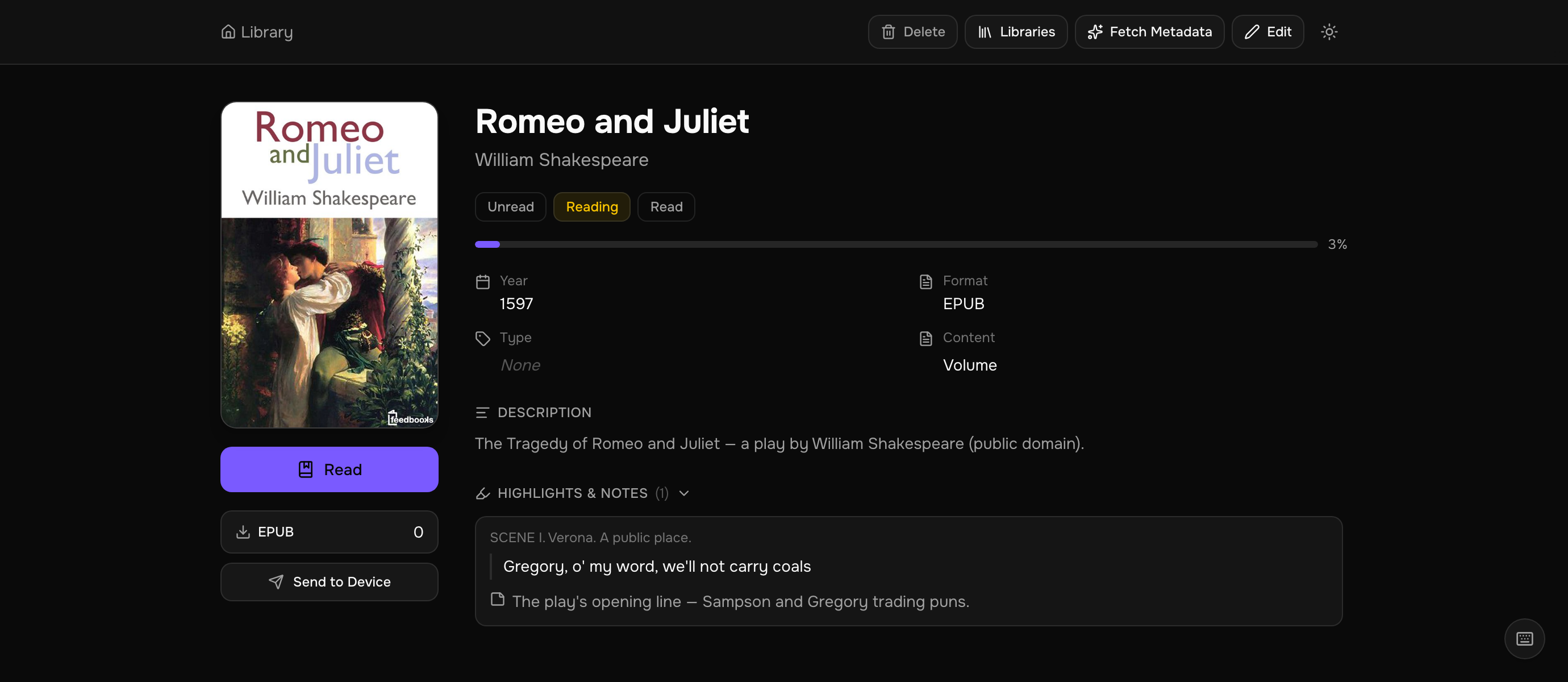
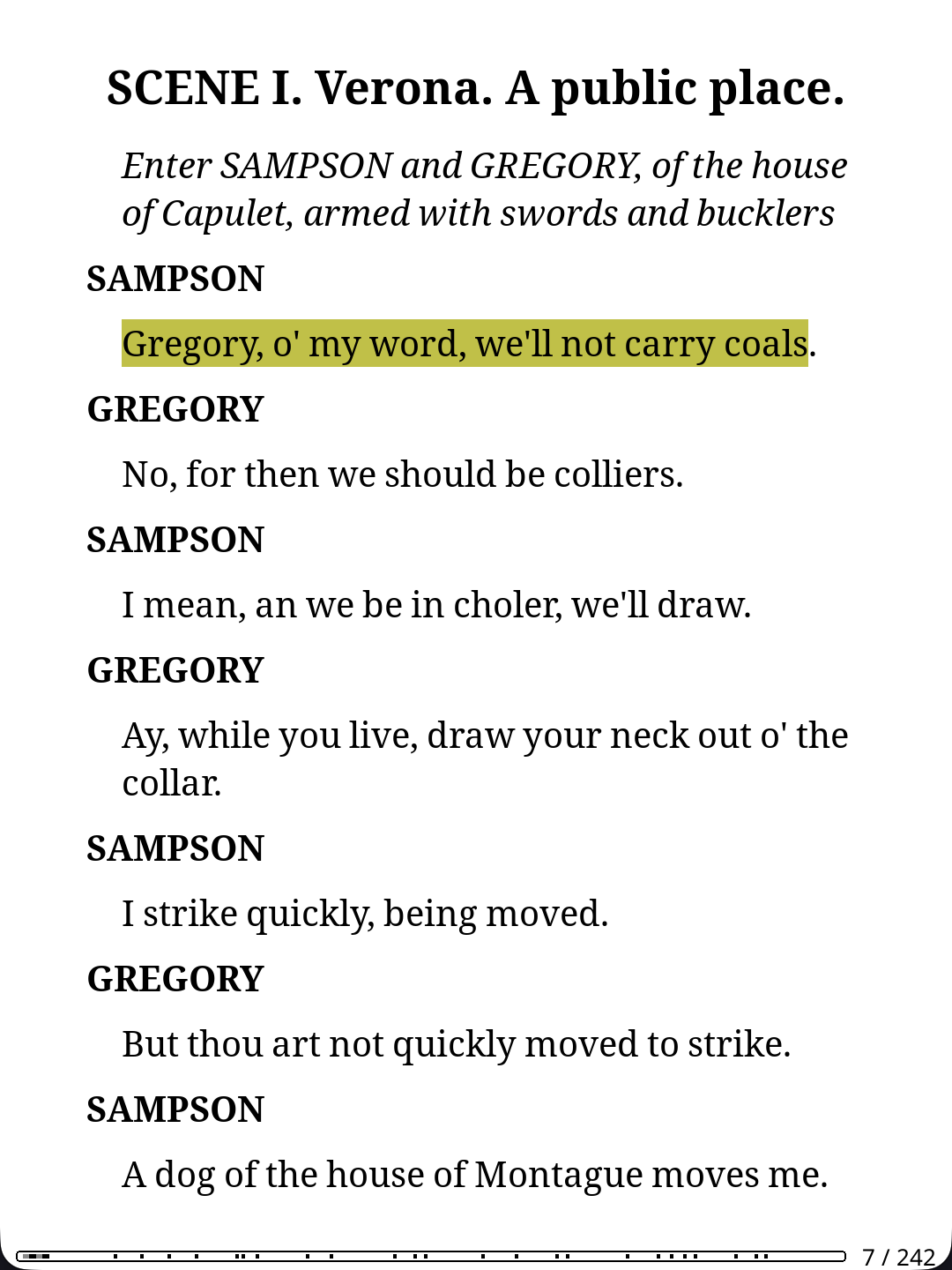
Notes edited (or added) on a highlight in the web app — from the Highlights page or a book page — arrive on the device at its next sync, exactly like an edit made on another device. Deleting a highlight on the web removes it on the device too.
Ratings & reviews sync
KOReader has a native Book status screen with a 1–5 star rating and a review. The plugin keeps it in step with the rating and review on Tome's book detail page,both ways: rate a book on the web and it appears in KOReader the next time you open it (for a book that came from Tome); rate it in KOReader and it flows up to Tome when you close or suspend. Ratings are per user and private to you, and your reading status (reading / finished) is left untouched — that syncs separately. The plugin tracks the last value it synced, so normally only the side that changed is sent; if a rating changed on both the web and the device since the last sync, Tome wins.
Metadata sync (Tome → KOReader)
Opt-in, per device: Settings → Apply Tome metadata to this device. When it is on, the metadata KOReader shows for the books on your device follows your Tome library: title, author, series and index, language, tags, description and cover. Edit a field in Tome and the device picks it up on its next sync; edit or reset a field on the device and it goes back to Tome's value. Tome is the source of truth.
The plugin writes KOReader's own custom metadata (the sidecar file and custom cover that Book information → Edit fills in by hand), never the book file itself, so file identity, reading position and highlights stay untouched and KOReader's own "reset" still restores what the file carries. Filenames on the device are not renamed. Only books Tome can verify by file hash are touched: a file that never passed through Tome, or a different edition, is reported as "not matched" and left alone, so one book's metadata can never land on another file.
Runs shortly after launch and when WiFi connects; Apply Tome metadata now in the TomeSync menu runs it on demand and shows a summary. Steady-state runs only exchange fingerprints, so nothing is re-sent until something actually changed. Requires plugin build 42.
Offline-first
With no network at all, sync skips instantly — no freezing, no error dialogs. Sessions save to disk and flush automatically the next time you open the lid with a working connection. Up to 200 sessions can queue offline, surviving KOReader restarts. When the device is online but the server does not answer, a request waits up to 5 seconds; from build 49 the plugin backs off after the first miss (1, 2, 4, 8, then 15 minutes between tries) and resets as soon as a request gets through, WiFi reconnects or you start a TomeSync action. Opening a book never waits on the network.
Books on the device
From build 50 the plugin tells Tome which of its books are on the device, so books show anOn Kindle pill (named after the device) and the library filters get a row per device with On Kindle and Not on Kindle. Only Tome book ids are sent, never file names. The list goes up on launch, wake, WiFi up, Sync now and after downloads, and replaces the previous one, so a book you delete drops out on the next sync.
Sync code: hand offline reading to your phone
Travelling, hotel WiFi with a captive portal, a device that never sees the home network: when the e-reader is offline but your phone is not, TomeSync → Show sync codeturns everything the device could not send — sessions, positions, ratings — into a QR code on the e-ink screen (several pages for a long stretch, tap to turn). Scan it with the Tome app (Home, or Settings → KOReader) or the web UI (Settings → KOReader → Scan a sync code) and it lands in Tome at once, with an overview of which books were touched: cover, sessions and time, pages, progress before and after.
Scanning twice, or the device flushing the same queue later over WiFi, changes nothing: sessions carry the same dedup key as the normal sync, and a position never overwrites one that is newer on the server. Answer Scanned on the device and the next code only carries newer reading. Highlights are not part of the code; they sync on the next real connection.
Series browser and bulk download
TomeSync lets you browse and download your library's series directly from KOReader — no browser needed.
From the home screen (no book open): open the wrench menu →TomeSync → Browse Series. A list shows every series in your library with book counts and authors. Tap a series to download all volumes at once.
The browser has four ways in: the series list itself, Search library…(free-text over title, author, and series, with your recent searches one tap away),Browse by author (the natural route to standalone books), andShelves — your saved shelves from the web app, listed with live book counts and resolved server-side, so a "German" or "unread manga" shelf is one tap away on the device. All of them open the same volume list: tap to download, hold a row to set read status.
From inside a book:
- Download full series — every book in the current book's series.
- Download rest of series — only volumes after your current one (based on series index).
Downloads are organized by book type and series:<home_dir>/<book_type>/<Series Name>/Vol. N — Title.ext(e.g. books/manga/One Piece/Vol. 1 — One Piece.epub). Format preference is epub → kepub.epub → cbz → pdf → mobi → azw3. Books already on the device are skipped. A live progress popup shows each download, and a summary reports downloaded/skipped/failed counts when finished.
Send to KOReader Beta
Browsing pulls books from the device; Send to KOReader pushes the other way — queue a book from the web and it lands on your e-reader, no email and no Amazon Send-to-Kindle. It's the KOReader-native counterpart to email send-to-device: the file arrives in its original format, filed into your library folders, instead of being converted and dropped into a stock reader you've bypassed.
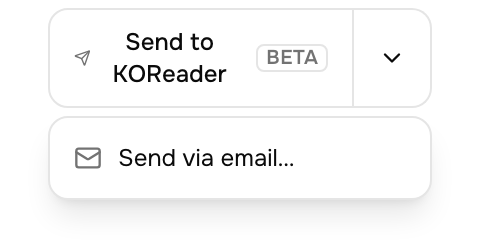
On any book (or a multi-select on the dashboard), use the Send to KOReadersplit button — the caret still offers Send via email…. There's nothing to pair: it queues to your account's inbox, and every KOReader you've connected pulls from the same queue.
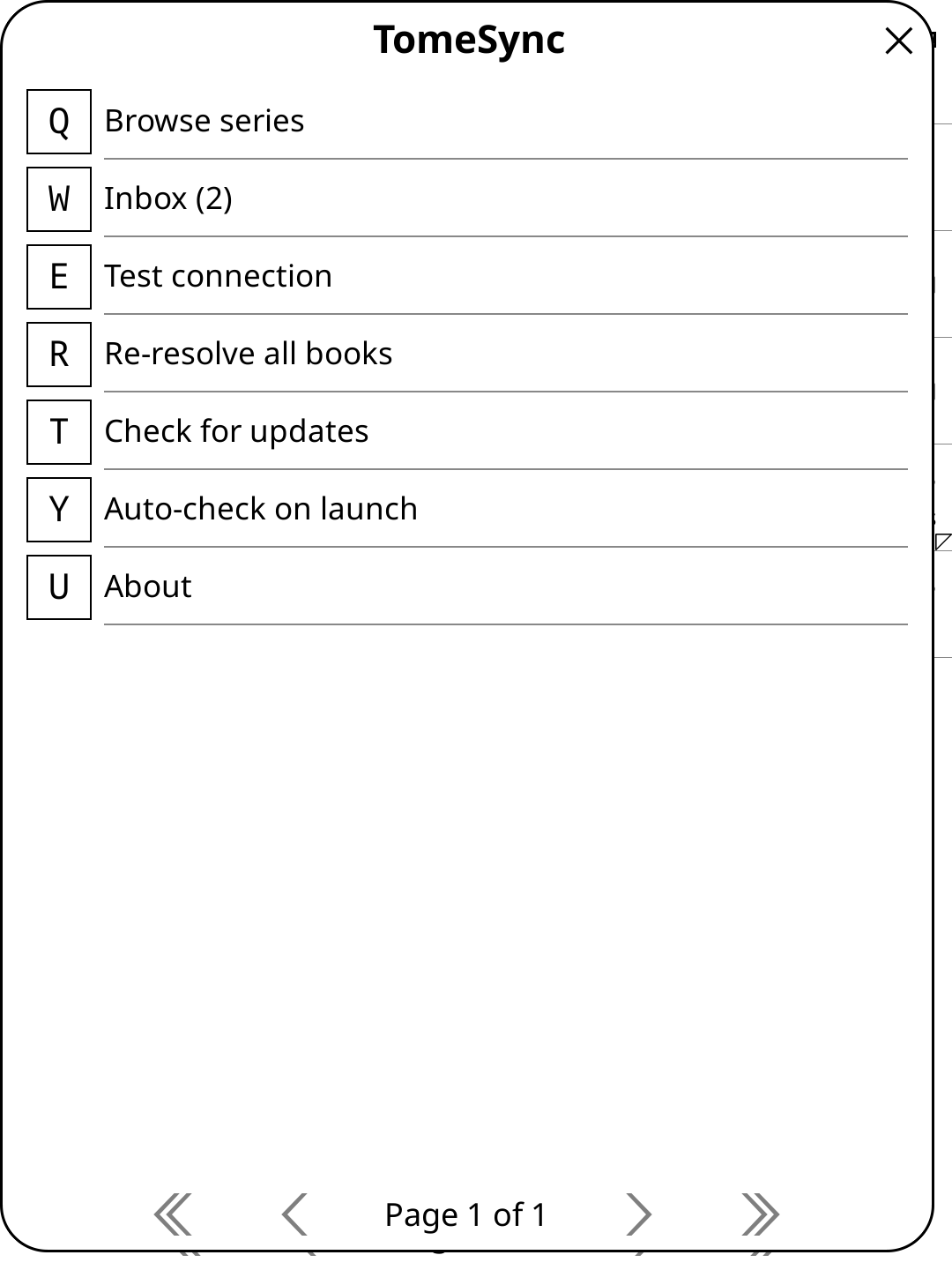
Delivery is not instant — it's a pull, not a push. The plugin shows anInbox (N) badge in the TomeSync menu; queued books arrive the next time KOReader checks in (shortly after launch), or tap Inbox to pull them now. Each book is filed exactly like a series download — by book type and series, or under its author for standalones — and marked delivered once it's on the device.
When it syncs
TomeSync hooks into KOReader's lifecycle events:
- Open a book — pulls the latest position from the server. If the server is ahead, jumps there. Also reconciles the book's rating.
- Every 50 page turns — heartbeat push of current position.
- Close the lid (suspend) — pushes position, highlights, and a rating set this session, and records a reading session.
- Open the lid (resume) — starts a new session, pushes position, flushes any queued offline sessions.
- Close a book — pushes final position, highlights, and a rating set this session, and records a session.
Sessions shorter than 10 seconds are filtered out.
Reading-history backfill
KOReader's built-in statistics plugin records every page you dwell on — going back to long before Tome existed. TomeSync can push that database to your server:TomeSync → Settings → Auto-sync reading history on launch, or run it once via Sync reading history. The first sync backfills everything (chunked and resumable — a dropped connection just continues next time); later syncs send only new reading. It carries reading time and pages only, never your read/unread status.
Once a book has imported history, that history becomes the source of truth for its device reading: it feeds the per-page Reading intensity andTime per chapter charts on the book page, and its sittings appear in thesession lists tagged imported. The plugin's own live sessions for the same sittings are excluded from the totals so nothing is counted twice; reading of that book on another device that has not synced its history still counts through its live sessions.
The sync keeps its place per device, under the name shown inTomeSync → Settings → Device name. It defaults to the device model (for example KindlePaperWhite4); set a name if you use several devices of the same kind. Renaming carries the device's imported history and sync position over.
Sync on suspend
Two opt-in settings (TomeSync → Settings) make your morning stats current without ever waking the device:
- Sync on suspend — when the device goes to sleep, catch up anything still pending (queued sessions, ratings, and — if enabled — the reading-history backfill), provided WiFi is already connected.
- Aggressive sync (turn WiFi on at suspend) — additionally brings the radio up first, syncs, and lets the device power it back down as it sleeps. Meant for devices that aggressively sleep WiFi (e.g. PocketBook). Uses more battery.
Everything on this path is resume-safe: if the device falls asleep mid-sync, it simply finishes on the next connection. Reconnecting WiFi also catches up the reading-history backfill without restarting KOReader.
Keeping the plugin updated
Once installed, TomeSync updates itself from your server — no re-download, no file copying. In KOReader's TomeSync menu:
- Check for updates — pulls the latest plugin from your server. If a newer build exists, it installs and asks you to restart KOReader.
- Auto-check on launch — opt-in toggle. When on, TomeSync quietly checks shortly after startup and prompts only when an update is available.
Your server URL, API key, and reading history carry over automatically — updates never touch them.
Changing servers & switching accounts
The downloaded plugin comes pre-configured, but the configuration isn't locked in. From plugin build 41, the connection can be changed on the device underTomeSync → Settings:
- Server URL — edit this if your server moved (new LAN IP, new domain, switch to HTTPS). This is the one case self-update can't fix for you: a device pointing at a dead address can't fetch anything from it, so the fix has to happen on the device. Clear the field to return to the baked-in address.
- Fallback server URL (build 49+) — an optional second address for the same server, tried when the server URL does not answer. Useful when one address only works on some networks, for example a router without hairpin NAT: the LAN address at home, the public or VPN address outside. The plugin tries the address that answered last first, so a network change costs one attempt and nothing after that.
- Sign in with code — connects the device to an account without typing any credentials. The plugin shows a short pairing code; enter it in Tome on any signed-in browser under Settings → Security → Quick Connect, and the device receives its own API key. Codes expire after 5 minutes, and nothing changes on the device until pairing completes — a failed attempt never breaks a working setup.
- Account — shows which account the device syncs as. It's decided by the API key, so switching accounts goes through Sign in with code, not a text field.
- Reset connection to baked-in defaults — forgets all of the above.
Stable book IDs (vs KOSync hashes)
KOSync identifies books by the MD5 of the file. Edit metadata, re-save, redownload — the hash changes and the sync history orphans. TomeSync uses Tome's canonical book ID, resolved from the filename via /api/tome-sync/resolve. Your reading history survives file changes.
Manual install (advanced)
If for some reason you want to install the plugin manually:
cd ~/.koreader/plugins
cp ~/Downloads/tomesync.koplugin.zip .
unzip tomesync.koplugin.zip
Troubleshooting
- "Test connection" fails — most often the server URL is wrong or the API key was revoked. Fix the address and re-pair under Changing servers & switching accounts (or re-download the plugin from Settings on older builds).
- Reading sessions not showing in stats — sessions flush on next sync. Pull-to-refresh in KOReader's TomeSync menu.
- See full troubleshooting.