KOSync-compatible apps
Tome speaks the KOSync protocol — the sync API popularised by KOReader's built-inProgress sync and supported by third-party readers likeReadest. Point any of them at your server and reading positions follow you between those appsand from Tome's web reader.
Setup
- In Tome, open Settings → KOReader and set a sync password underKOSync. This creates your sync account (same username as your Tome login).
- In the client, configure a custom sync server pointing at
https://your-server/api/v1. In KOReader that's Tools → Progress sync → Custom sync server; in Readest it's under Settings → Sync. - Log in with your Tome username and the sync password. Done — reading a book pushes progress on close, and opening it pulls the latest position.
What syncs
Positions sync at percentage precision across app families. Two KOReader-family clients exchange exact locators as usual, but the web reader speaks EPUB CFI and KOSync clients don't — the formats aren't convertible, so cross-family sync opens the book at the right percentage rather than the exact paragraph.
- From Tome to your app: the sync pull answers with whatever is newest — the last KOSync push, the web reader's position, or a TomeSync device's position. Read a few chapters in the browser at lunch and Readest picks up where you stopped.
- From your app to Tome: pushes update the book's progress and read status (books finish at 99%, and a finished book stays finished on a re-read). They deliberately do not move positions on devices running the TomeSync plugin — third-party clients can't disturb your e-reader's sync.
Linking synced books
KOSync identifies a book by a hash of the file, so Tome has to connect that hash to the right library entry before progress can flow. Any file that was downloaded from Tome — web download, OPDS, or the plugin — is recognised automatically by its hash on the first push or pull. Nothing to do.
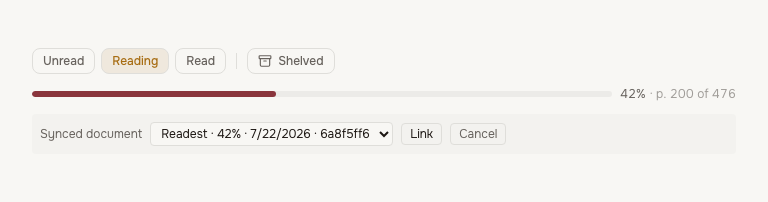
For a file Tome has never served (sideloaded from elsewhere), the book page offers a manual picker: it lists synced documents that aren't attached to any book yet, with device, progress and date, and one click links the right one.
Troubleshooting
- "401 Unauthorized" — the sync password doesn't match. Set it again inSettings → KOReader; re-saving overwrites the old credential.
- Progress lands in the app but not in Tome — the document isn't linked to a book yet. Open the book's page and use Link KOReader sync.
- The app doesn't jump to the web position — some clients only apply a pulled position when it's ahead of the local one, or ask before jumping backwards. Check the client's conflict setting (KOReader: Progress sync → Sync behaviour).