Reading stats
Tome's stats are built from real session data — every minute logged by the web reader and every session the TomeSync KOReader plugin reports. No estimates from page counts, no fudge factors, no guessing. If a chart is empty, it's because the data isn't there yet.
The page itself is a dashboard: every chart on it is a tile on a drag-and-resize grid, and the three boards it ships with — Overview, Habits, and Library — are just the defaults.
Make it yours
Hit Edit and the grid opens up: drag tiles by their header, resize them by the corner handle, remove or duplicate them, and undo a removal straight from the toast.Add tile opens a gallery of 50 widgets with live previews — everything documented below, plus extras like a paginated session log, reading by weekday, a time-of-day split, time by format, recently finished, a monthly streak calendar, and the word-count tiles (words read, reading speed, book length).
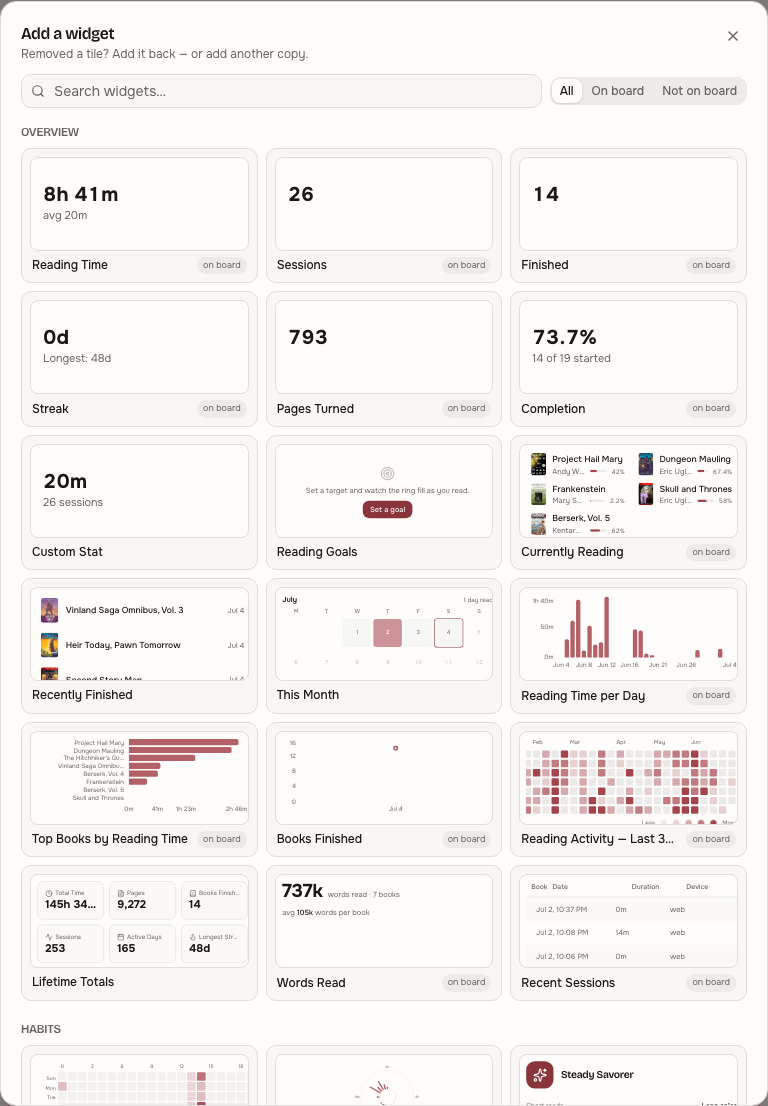
Tiles are individually configurable where it makes sense: chart tiles switch between bar, line, and area; time-series tiles can follow the page's range picker or pin their own window; the Custom Stat tile counts whichever metric you pick; Series Spotlight focuses on one series of your choice.
Tabs are boards. Create new ones — empty, duplicated from the current board, or from the built-in defaults — rename them with a double-click, and delete the ones you don't want (undo included). Layouts are saved per-user on the server, so your boards follow you to every device; a board can also be exported as JSON to share and imported on another account, and the camera button saves any board as a PNG image.
Where the data comes from
Two writers, one table. The web reader and theTomeSync plugin both POST to reading_sessions: start time, end time, pages turned, device. The stats endpoints aggregate from there. TheUserBookStatus table provides finished-book counts (status = "read") and the TomeSyncPosition table provides current-progress percentages.
Reading from before Tome can come along too: Settings → Import reading history takes a Goodreads or StoryGraph CSV export, matches it against your library (ISBN first, then title/author) with a full preview, and only ever fills gaps — statuses, ratings, reviews, and finish dates you already have are never overwritten.
Fixing a runaway session
A device that never actually went to sleep can sync a session hours longer than the reading it contains — 15 minutes of pages, then a night of idle screen. TheTomeSync plugin prevents this at the source with its idle time cap, but sessions from older plugin builds (or other clients) are sanity-checked on arrival: anything implausibly long, or averaging many minutes per page turn, is flagged with a warning icon and raises a bell notification.
Any session list lets you fix one: trim (the scissors icon) shortens the session to what you actually read, while delete removes it entirely. The trim editor pre-fills a suggestion — the session's own page turns priced at your median seconds-per-page, computed from your recent plausible sessions so the runaways can't skew their own baseline. It's only ever a pre-fill; nothing is changed until you confirm. Session lists live in three places: the Recent Sessions tile (sortable longest-first), the per-book time table on the Library board, and a collapsible Sessions section under Reading Stats on every book page — so they stay reachable even if you've removed the tiles from your dashboard.
Imported KOReader history in the session lists
Reading synced from KOReader's own statistics database — including everything read before Tome existed, if you enabled the reading-history backfill — appears in the same session lists as everything else. The raw per-page timings are grouped into sittings the way KOReader itself thinks about sessions (a gap of more than 30 minutes starts a new one), and each sitting shows as a row taggedimported.
Imported sittings can be deleted individually — the fix for a book opened by accident, whose stray minutes used to be removable only by wiping the book's entire imported history. Deleting one removes exactly that sitting's page timings and the totals drop with it. They can't be trimmed: KOReader already caps idle time at the source, so there is nothing to cut. Two labels tell the rest of the story: when imported history describes a sitting the plugin also recorded as a live session, that live session stays listed with anot counted tag while the imported row carries the totals — nothing is ever counted twice, and nothing silently disappears. The rule is per sitting, not per book: reading the same book on a second device that never synced its history still counts through its live sessions. The small info icon next to every session list explains all labels in place.
For getting at one stray day quickly, the Activity chart on a book's Reading Stats block is clickable: each bar opens a popup with the sittings that started on that day, with the same trim and delete actions — no scrolling the full log.
Overview board
The "where am I right now?" board. Designed to be glanceable. Like every section below, each chart here is a tile — what follows describes the default layout.
Totals + streak

Six counters across the top, scoped to the period selector (default 30d, options 7d / 30d / 90d / 365d / all). Sum of duration_seconds, count of session rows, finished books, current streak, pages turned, completion rate. Average session length is shown under Reading Time.
Streak is in local-with-rollover days, with a one-day grace: if you haven't read yet today, the streak still shows yesterday's value instead of dropping to zero. Once midnight (plus rollover) passes without a session, the streak breaks.
Currently reading

Books with UserBookStatus.status = "reading", ordered by most-recently-read. Progress comes from TomeSyncPosition.percentage when KOReader has reported in, else UserBookStatus.progress_pct from the web reader.
Reading time per day
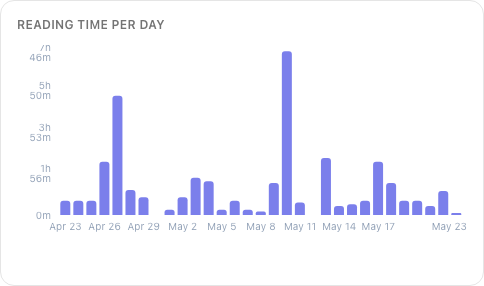
One bar per day in the selected period. Tallest spike is your biggest session day. Useful to spot binges (single tall bar) vs steady consistency (many short bars).
Top books
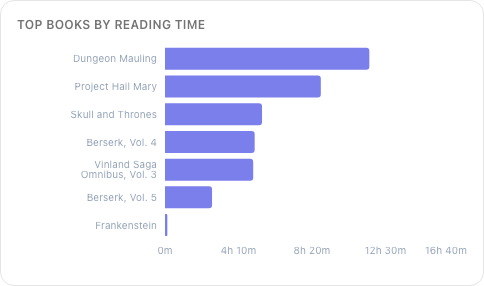
Top 10 books by total reading time in the period. Joins reading_sessions againstbooks and groups by book_id. The big numbers usually surface a book you've been chewing on for weeks.
365-day activity grid
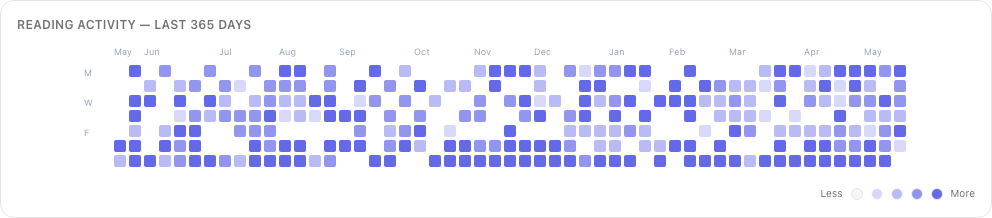
GitHub-style annual heatmap of daily reading minutes. Cells go from empty (no session) to full accent (1h+ in a day). Useful to spot patterns — vacation blocks, work-week droughts, weekend regulars.
Habits board
The "when and how do I read?" board.
Reading DNA
A tile version of the Home page's Reading DNA card: your reading personality as an archetype plus the trait spectrums that produced it (short reads vs. long epics, focused vs. eclectic, early bird vs. night owl, …). Add it fromAdd tile under Habits.
Hour × day-of-week heatmap
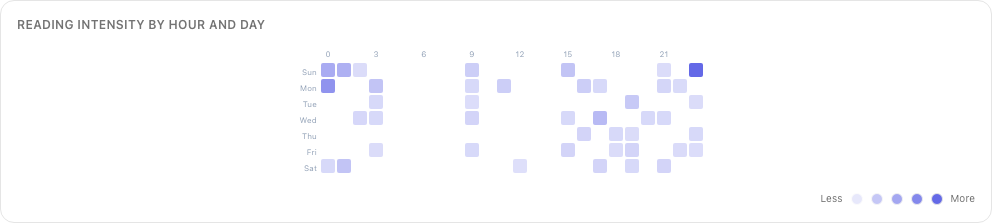
A 7×24 grid. Each cell is "minutes read in this hour of this weekday, summed across the selected period." The colour scale is per-user: the darkest cell is your peak, everything else is relative to it.
The interpretation: find your reading windows. If Monday 21:00 lights up but Monday 09:00 is blank, you read at night, not before work. If Saturday morning blooms after a few months of use, you read more on weekends than you thought. The point isn't the absolute numbers, it's the shape.
Session timeline
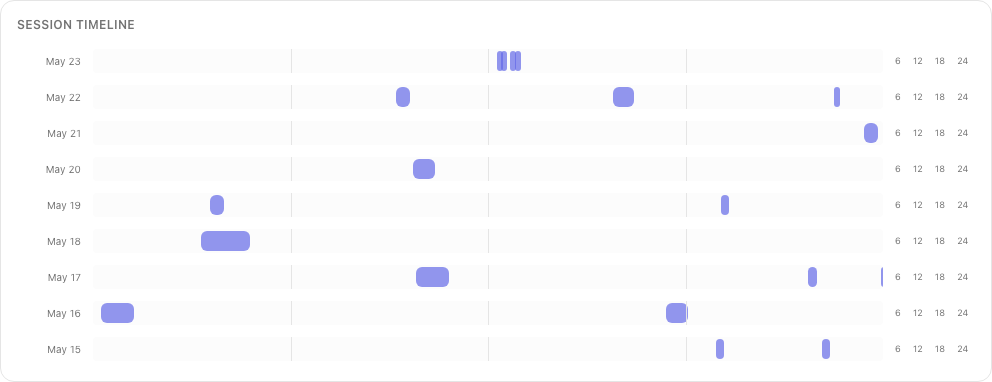
Recent sessions plotted as horizontal bars on a time axis — start time on the x-axis, duration as bar length, one row per date. Lets you see binge sessions (long bars) vs nibble sessions (short bars), and at a glance whether you read in one big block or many small ones.
Reading pace
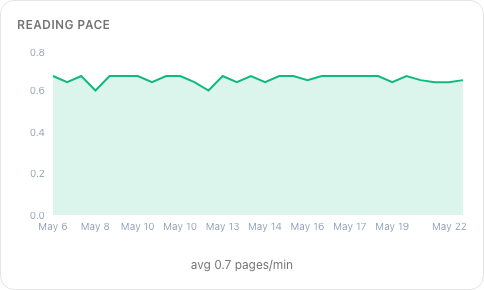
Pages per minute, computed per-session from sessions withduration_seconds > 60 and pages_turned > 0.
Two things this catches: format effects (manga clocks 5+ ppm, dense literary fiction sometimes 1 ppm) and tiredness (your evening pace usually drops below your morning pace). Don't compare your number to anyone else's — pace is a fingerprint, not a benchmark.
Monthly comparison
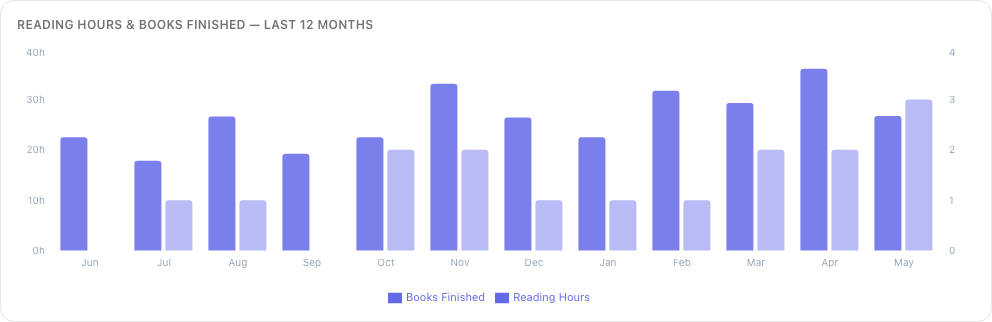
Reading hours + books finished by month, last 12 months. Smooths out the day-to-day noise — month-on-month is more legible than week-on-week.
Library board
The "what have I been reading?" board. Focused on books, not on time.
Series completion ladder
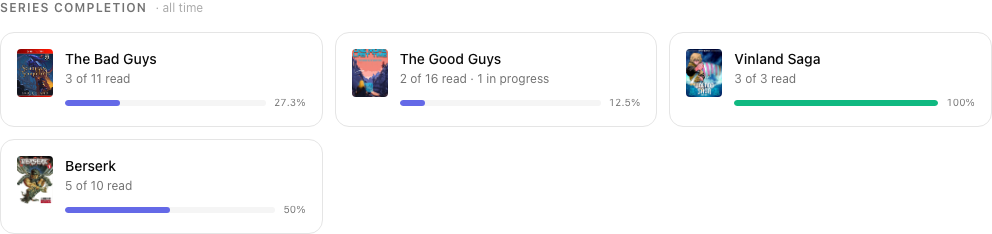
For every series you have at least one volume in, a card showing volumes you own vs volumes you've finished. Standalones are skipped — they're not a ladder.
Author affinity
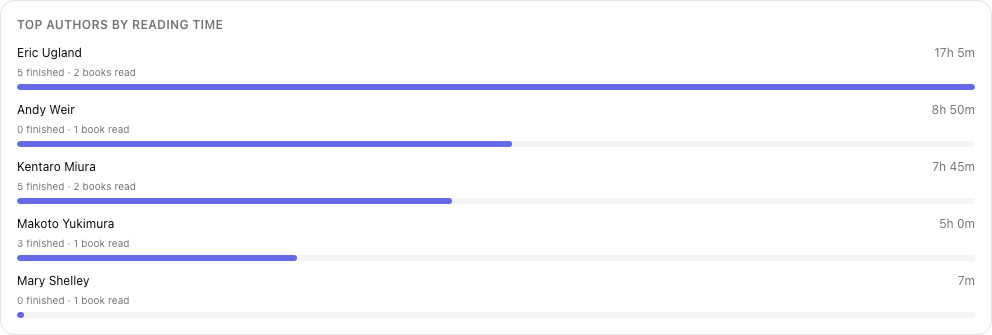
Authors ranked by total minutes spent in their books. Distinct from "most books read" — an author you've read three short novels by ranks lower than one whose 1500-page tome you've finished.
Completion by type

For each BookType (Novels, Manga, Comics, etc.) — total books started vs finished. Quick way to see "I'm a manga reader who pretends to read novels" or vice versa.
Category breakdown
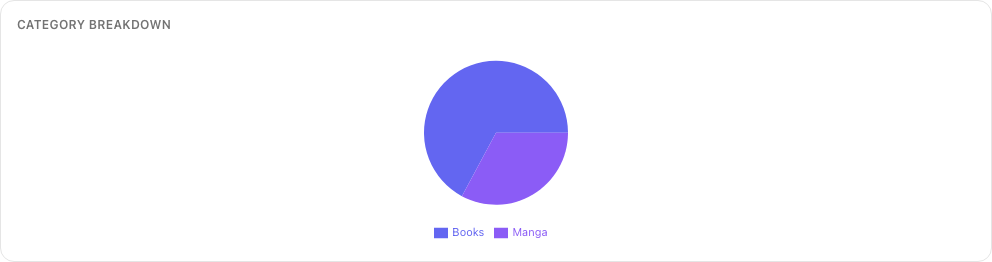
Reading time split by book type — pie chart format. Pairs with completion-by-type to show not just how much you finish but how much time you sink in each format.
Library growth
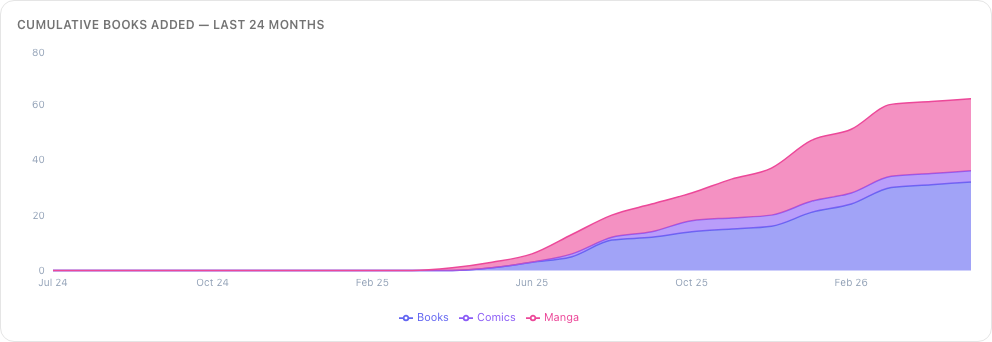
A cumulative line chart of books.added_at grouped by month and split by book type. Not about reading — about hoarding. Goes up and to the right. Useful for noticing acquisition sprees you'd otherwise forget about.
Backlog
How long the pile would take at your own pace. The tile sums an estimate for every book you haven't started in its scope and shows the total in hours and in days, with a per-type breakdown underneath. The scope is picked in the tile's edit-mode settings: yourWant to Read queue (the default), everything unread, a library, or a shelf.
- Hours come from the book's word count at your measured words per minute. Books without a word count — CBZ and PDF — fall back to your average time per finished book of that type. A book Tome can't place either way is counted as "not estimated yet" rather than guessed.
- Days come from your minutes per day over the last 30 days, or the last 90 when the past month was quiet. No recent reading, no day figure.
The same estimate appears in two other places: the book page shows an Est. read time cell in Details (hover it to see which pace was used), and the series page puts "left in this series" over the unstarted volumes.
Timeline board
Your reading life as a Gantt chart. One lane per series (standalones get their own), named in a frozen rail on the left; every book is a bar spanning its first to last active reading day, with the volume number at the bar's start. Inside each bar, every day you actually read is a tick whose intensity encodes that day's minutes — scaled against your 90th-percentile reading day, so one marathon doesn't flatten every normal evening. Gaps inside a bar are days the book rested; gaps between bars are pauses between volumes.
The data is lifetime and fully reconciled: live sessions and imported KOReader history merge with the same page-stats-win-per-book rule as the rest of stats, bucketed by the canonical 4-hour-rollover reading day. Lanes sort by most recent activity and the view opens at today, so the top-right corner is what you're reading now — pan left for history. Zoom from a year-at-a-glance down to month detail; hovering a bar answers at day resolution ("15 May · 22m", or "no reading" on a gap day) alongside the book's totals, and clicking opens the book. On phones the rail narrows and the first tap inspects while a second tap navigates.
Timeline is its own board and renders full-bleed — edge to edge, viewport-tall. The ribbon is also available as a regular tile from the gallery for any other board.
Word-count & page insights
Once Tome knows your books' word counts and has imported your KOReader reading history, a few tiles turn that into things you can't get from session timing alone. All are in the tile gallery.
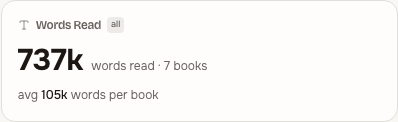
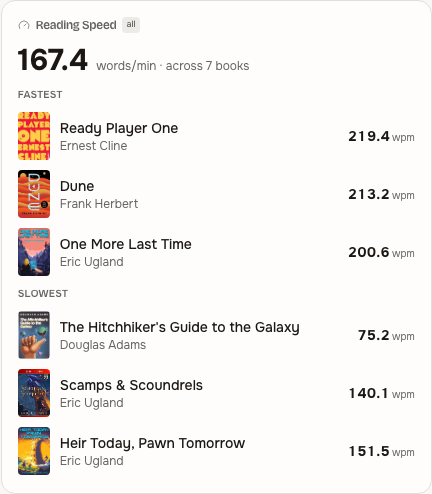
Words Read totals the words in every book you've finished, andReading Speed is your true words-per-minute — word count divided by the time KOReader actually recorded — with your fastest and slowest books.
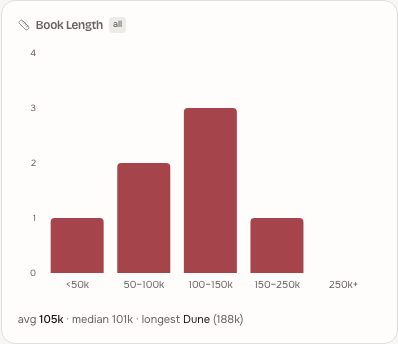
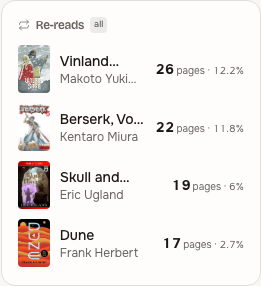
Book Length shows how long the books you finish tend to be, andRe-reads ranks the books whose pages you keep coming back to.
On each book's page, a Reading intensity strip shows where your time went across the book — page by page — with a real “X of Y pages” read and a note when you've re-read stretches.

The same per-book view carries a full reading log: every session with device, duration and pages, your day-by-day progress, and a per-book time total. You canlog a session by hand (paper reading, or a device that wasn't synced) andexport a book's log to CSV or JSON.
Charts that aren't here yet
Things explicitly considered and not built:
- Per-chapter pace within a book — too noisy for the current data shape; sessions cross chapters and chapter boundaries aren't tracked.
- Sleep-quality correlation — we have the data (late-night session detection) but no second data source to correlate against.
- Multi-user leaderboards — stats are per-user only by design. Tome isn't trying to gamify reading across a household.
API access
All the data behind these charts is reachable via the API. Useful for one-off scripts:
GET /api/stats?days=30&tz_offset=-120— the main bundle (everything on this page).GET /api/stats/completion-estimates— projected finish dates for in-progress books.GET /api/stats/sessions— paged session list, oldest first.GET /api/stats/timeline— lifetime per-book reading spans and active days (the Timeline board).DELETE /api/stats/sessions/{id}— delete a misfire.GET /api/stats/dashboard/PUT /api/stats/dashboard— your saved boards (opaque JSON, 256 KB cap). This is what syncs layouts across devices.
Authenticate with an API token or a JWT. Times are UTC in the payload; bucketing happens server-side using the tz_offset you pass.