OPDS feed
OPDS — the Open Publication Distribution System — is the e-reader equivalent of an RSS feed: a standard Atom-based catalogue that any compliant reader app can browse and download from. Tome exposes one at /opds/, secured with HTTP Basic Auth.
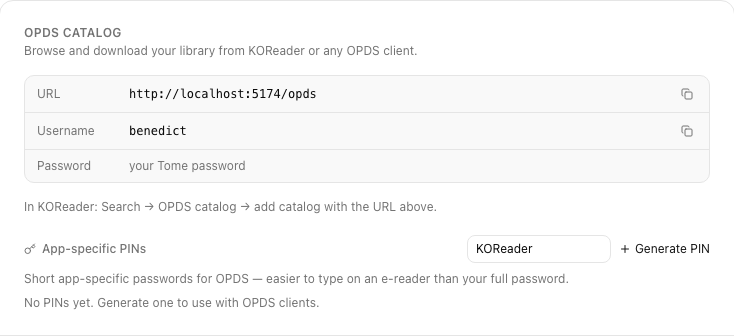
OPDS PINs
OPDS clients send Basic Auth on every request — which means your password gets typed into each device. Instead, Tome lets you generate a short OPDS PIN per user that works in place of the password, scoped to OPDS only.
- In Tome, open Settings → OPDS.
- Click Generate PIN. A 6-digit code appears.
- Use your username + the PIN as Basic Auth credentials in your OPDS client.
- The PIN doesn't expire automatically. Revoke it from the same page when you're done.
Pointing a client at Tome
KOReader
Even if you've installed the TomeSync plugin, KOReader's native OPDS still works as a fallback. From the wrench menu → Search → OPDS Catalog → Add catalog:
- Catalog name: Tome
- Catalog URL:
https://your-tome.example.com/opds/ - Username: your Tome username
- Password: your OPDS PIN (not your account password)
Other clients (Moon+, KyBook, Foliate, etc.)
Every OPDS client takes the same three inputs: a URL, a username, and a password. Usehttps://your-tome/opds/, your username, and the PIN. If a client asks for "atom feed URL" vs "catalog URL," they're the same thing.
What the feed exposes
- The root catalog lists libraries you can see (subject to the same visibility rules as the web UI).
- Inside each library, books are listed flat or grouped by series.
- Each book entry links to its EPUB / CBZ / PDF download, plus a cover thumbnail.
- Downloads are streamed straight from
TOME_LIBRARY_DIR— no transcoding, no rebuild.
Troubleshooting
- "401 Unauthorized" — wrong username or PIN. Re-issue the PIN from Settings.
- Empty catalog — your role probably doesn't have access to any libraries yet. Check Users → your account → assigned libraries.
- Downloads fail in the client — some clients can't follow auth across redirects. Make sure your reverse proxy isn't redirecting
/opds/to/opdsor vice versa.