Themes & shortcuts
Tome ships with three built-in themes and supports fully custom colour palettes. Keyboard shortcuts are available on every page for quick navigation.
Built-in themes
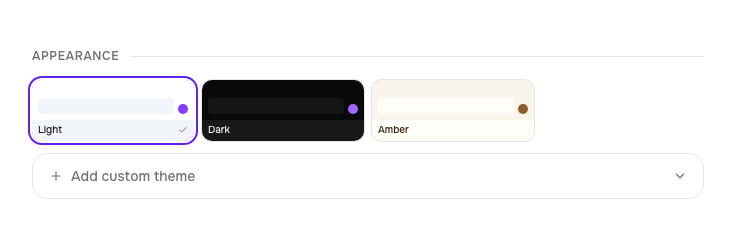
Switch between Light, Dark, and Amber from the user menu in the sidebar (desktop) or the bottom drawer (mobile). The active theme is stored per-browser in localStorage.
- Light — crisp whites with brand purple accents
- Dark — near-black backgrounds, easy on late-night reading
- Amber — warm cream and burnt orange, a parchment feel
Custom themes
In Settings, scroll to the theme section and click New custom theme. You provide 10 hex colour values that define every surface in the UI:
- Background, foreground, card
- Primary, primary foreground
- Muted, muted foreground
- Accent, border, destructive
Name your theme, mark it as dark or light (so Tailwind's dark: variants apply
correctly), and save. Custom themes appear in the theme picker alongside the built-in ones.
Example palettes — copy and paste into the color input
The 10 values map to: background, foreground, card, primary, primary-foreground, muted, muted-foreground, accent, border, destructive.
Nord
#2E3440, #D8DEE9, #3B4252, #88C0D0, #2E3440, #4C566A, #D8DEE9, #81A1C1, #4C566A, #BF616ACatppuccin Mocha
#1E1E2E, #CDD6F4, #313244, #CBA6F7, #1E1E2E, #45475A, #A6ADC8, #B4BEFE, #45475A, #F38BA8Solarized Light
#FDF6E3, #657B83, #EEE8D5, #268BD2, #FDF6E3, #EEE8D5, #93A1A1, #2AA198, #93A1A1, #DC322FRosé Pine
#191724, #E0DEF4, #1F1D2E, #C4A7E7, #191724, #26233A, #908CAA, #F6C177, #26233A, #EB6F92Keyboard shortcuts
Press ? anywhere to open the keyboard shortcuts modal. Here's the full list:
Dashboard
| Key | Action |
|---|---|
/ | Focus search |
j or ↓ | Next book |
k or ↑ | Previous book |
Enter | Open selected book |
Esc | Clear selection / blur search |
Book detail
| Key | Action |
|---|---|
r | Open reader |
e | Toggle metadata editor |
Esc | Go back |
Reader
| Key | Action |
|---|---|
← or ↑ | Previous page |
→ or ↓ | Next page |